Missing content scroll buttons in Smart Content pane?
 Ptrope
Posts: 696
Ptrope
Posts: 696
My Content Library has buttons to navigate pages:
My Smart Content pane only tells me there are hundreds of items, but I can't navigate to them:
Is this a bug or a design flaw?
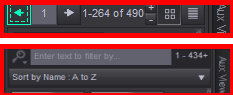
DS_Scroll buttons.png
233 x 95 - 7K
Post edited by Ptrope on

Daz 3D is part of 
Connect
DAZ Productions, Inc.
7533 S Center View Ct #4664
West Jordan, UT 84084
Licensing Agreement | Terms of Service | Privacy Policy | EULA
© 2026 Daz Productions Inc. All Rights Reserved.
Comments
Is that the whole pane or only a crop? Is Filter By Context checked, at bottom-left?