Camera control deficiencies?
 cobusp
Posts: 320
cobusp
Posts: 320
I haven't done any serious animation for years, but now I want to do some for a music video of mine.
However, I find serious deficiencies in camera control for animation, and hopefully someone can point to ways around it.
1. You cannot bank the camera when it's pointed at a Target Helper.
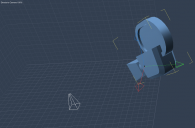
2. The camera's axis widget is aligned to the workspace, not perpendicular to the camera itself (see screenshot). This makes it very hard to move it forward in space on its own axis.
Can someone help, please?

Daz 3D is part of 
Connect
DAZ Productions, Inc.
7533 S Center View Ct #4664
West Jordan, UT 84084
Licensing Agreement | Terms of Service | Privacy Policy | EULA
© 2026 Daz Productions Inc. All Rights Reserved.
Comments
Try the Universal Selector tool instead
1. You can use the "motion:- transform" and add dolly/bank rotations to the camera, but it will reset when you move the helper.
2. Use the "universal manipulator"
AH, thank you!
To add dolly/bank rotations -- I do not see such an option under Transfrom (see my screenshot)
Just change the "Rotation" value in the Y axis.
Thank you!