In the dark perhaps
 deeahr2169
Posts: 497
deeahr2169
Posts: 497
in New Users
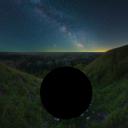
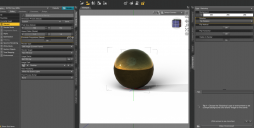
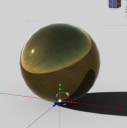
Once again I have a problem which I think has an obvious solution, but the solution eludes me. For no apparent reason I seem to be unable to render images in either iRay or 3delight, and perhaps the reason is that my lighting isn’t working correctly.
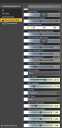
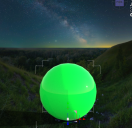
I am including a few screen shots to illustrate the conditions and results…
Any help or advice would be much appreciated

test 101.jpg
750 x 750 - 351K
test 102.jpg
750 x 750 - 319K

test 103 iray.jpg
750 x 750 - 20K
SS 01.png
1624 x 820 - 375K
SS 02.png
379 x 786 - 91K
SS03.png
661 x 641 - 701K
SS04.png
626 x 631 - 353K

Daz 3D is part of 
Connect
DAZ Productions, Inc.
7533 S Center View Ct #4664
West Jordan, UT 84084
Licensing Agreement | Terms of Service | Privacy Policy | EULA
© 2026 Daz Productions Inc. All Rights Reserved.
Comments
What is your background? Just an image in Environment tab?
For simplicity i used the environment tab. However I do often used JPEG images overlaid onto a pane or cube. At other times I use a part of a prop, for example the background from Stonemasons products can be very goood. Nothing seems to make any difference to the images in the curent rendering problem....
OK for the record I removed Daz from my machine in its entirity and began anew. So I now have a clean version of Studio with the defualt content installed via DIM. It doesnt hurt to clean up occasionally and somewhere in all the files I have installed there may well be something causing this problem. Thigs is that only using the default content I have had to use G9 which I am not used to, but the principles remain the same, and unfortunatley so do the results of rendering.
I am at a loss, help please!
What is the difference betweem those where you can see the shpere and the other?
What is Environment mode set to?
Not sure about the question or indeed the answer.... However having bitten the bullet and re installed DS with no resolution I found out about the factory reset option, which I took. I need to make sure this works for everything that has to be reinstalled because as far as I can see i only have the preinstallled G9 content to test renders on but so far it works on this content and the resulting render in iRay looks okay to me...