Legacy UVs and Geoshells
 Kalighost
Posts: 1
Kalighost
Posts: 1
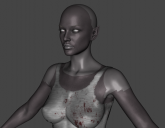
Hello everyone. I need a little bit of help. I have been using Legacy UVs for Genesis 9 to use a Genesis 3 character skin on Genesis 9. Everyting works as its supposed to, but when I try to apply a dirt skin geoshell made for G9 to the figure, it removes the texture on the shoulders, behind the head, and lips, as I show in the attached image.
Has anyone come across this issue and been able to find a fix or workaround? I have tried adjusting the offset, but lowering it down to 0 will make the white parts disappear, but also the effect of the geoshell. I've also tried using dirt effects for G3 but I get the same result.
Thank you for any help!

Daz 3D is part of 
Connect
DAZ Productions, Inc.
7533 S Center View Ct #4664
West Jordan, UT 84084
Licensing Agreement | Terms of Service | Privacy Policy | EULA
© 2026 Daz Productions Inc. All Rights Reserved.
Comments
The Legacy UV sets work by using GeoGrafts to add extra surface groups to the model for the areas where two maps of the elgacy set need to apply to an area that is one surface on the target figure. Anything which uses material presets applies to named surface groups, and it won't have been set up to know about the extras added by the Legacy UVs. I am not sure how this set of Legacy UVs iss et up - if it has the Genesis 9 UVs as wel as the Genesis 3, and if it has the split between the Genesis 9 surfaces as well as the Genesis 3, then you could just copy/paste (after applying the base shader if need be) from the Genesis 9 surface to the Legacy figure surface; if not then it may not be possible to use the set, though depending on how much detail there is there copy-paste without being able to use the correct UVs and/or groups may look usable at least.
Actually a geo-shell doesn't remove any textures but just replicates the surfaces from G9 as well as the geo-grafts on G9 as the material zones of the geo-shell... that's how a geo-shell works.
So, any geoshell-based skin effect products for G9 (dirt, scar, bruise, etc...) cannot be used together with Legacy for G9 (F/M) because their UV Sets don't support G9's UVs that are used by the former products, i.e. you have no way to replicate the dirt texture from the shell to the "geo-graft surfaces", unless you convert texture maps ~~
Your easiest way can be using Material Suit from https://www.daz3d.com/rssy-genesis-8-and-81-female-material-suit-for-genesis-9 or you make Material Suits yourself ~~
That is what I was trying to say, but I wasn't sure how the grafts were mapped or grouped - it would certainly be possible to set them up to work with native Genesis 9 mapping for situations like this..
Thank you so much for the info. I've tried using geoshells from both G3 and G9, on the figure and the geoshell, but still no luck. I also started looking into Material Suit and looks like it would be exactly what I need, but I'm working with a G3 skin UV on G9.
I did find a temporary workaround, I found out I can simply turn off the skin dirt geoshell for the shoulders, neck, and lips. It works as long as the character's shoulders and neck are covered and the hair hides the back of the head and neck, but if the shoulders and neck are exposed you'll notice the dirt effect not covering those and it doesn't look right. I'll keep exploring possibilities and if I find a fix I'll update it with the info for the community. Thank you again!