Animal fur is not rendered correctly in DAZ studio 4.24
 Astronautcheng
Posts: 1
Astronautcheng
Posts: 1
The fur is fine in DAZ STUDIO 2025, like in picture 1,
but in DAZ studio 4.24, it is too thin in render. Every setting is the same, I adjusted line tesselation sides setting but nothing changed.
Really frustrated, I need mesh grabber so I have to use 4.24. Appreciated for any help
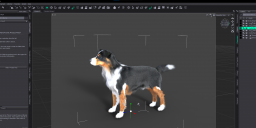
2025-10-26 013413.png
3840 x 1590 - 1M
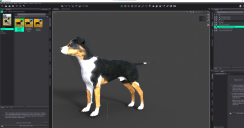
2025-10-26 013500.png
3757 x 1969 - 2M

Daz 3D is part of 
Connect
DAZ Productions, Inc.
7533 S Center View Ct #4664
West Jordan, UT 84084
Licensing Agreement | Terms of Service | Privacy Policy | EULA
© 2026 Daz Productions Inc. All Rights Reserved.
Comments
Which tools are active? It looks like you have one of the standard posing tools in DS 2025, but not in 4.24 - having the content creation tools active, which are intended for working directly on the models, turns off features like hair interpolation, which add extra virtual details to the model that cannot be manipulated directly.
As Richard mentioned above, having certain tools selected can prevent dForce hair/fur from being previewed or rendered. Mesh Grabber is one of those tools. (It would be hard to manipulate mesh when all that fur is previewed in the viewport. But leaving Mesh Grabber tool selected after you are done using it, will prevent the full fur from showing.)
Technically, what you showed in your attachment is not "a render"; it is an "Iray Preview" in the viewport. That is an important distinction in the case of dForce hair and fur. There are also other settings that must be enabled in order to see the hair/fur during Iray Preview.Perhaps they are enabled in DS 2025 but not DS 4.24. Select the fur object (not the dog itself) in the Scene pane. Then go to the Parameters pane and look in the General>Simulation>Hair part to be sure you have all three Hairs options On, to see the fur in the Iray Viewport. Preview PR Hairs is often Off by default, because displaying all that fur in the viewport preview can really slow things down and overwhelm lower end computers/graphics cards.
Line Tessellation should normally be set to 0 for both Viewport and Render, when modern dForce hair/fur shaders are used. The 0 value uses more efficient Iray curves for the hair, that preview and render nicely.
Unchecking Mesh Grabber works for me. Thank you guys so much
You are welcome. We like to help. Thanks for posting what worked for you.