Genesis 9 Beard on a Genesis 8 Male
 Pinkspectre
Posts: 53
Pinkspectre
Posts: 53
Hi was wondering if anyone can help me.
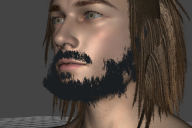
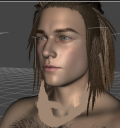
I normally use Autofit and that works most of the time but I am trying to get a beard from a Genesis 9 character onto my Genesis 8 male but when using AutoFit, the beard deforms (Image 1 Black Beard). When I try to manually place it, then either parent it to the Head Node or use Utility Transfer, it moves to the center of the body and can't be moved (Image 2 Blonde Beard). I uploaded images.
This is using the Toshi Hair And Beard for Genesis 9. https://www.daz3d.com/toshi-hair-and-beard-for-genesis-9

Daz 3D is part of 
Connect
DAZ Productions, Inc.
7533 S Center View Ct #4664
West Jordan, UT 84084
Licensing Agreement | Terms of Service | Privacy Policy | EULA
© 2026 Daz Productions Inc. All Rights Reserved.
Comments
Your char seems shorter than G8M Base figure. You can try:
- Select the beard, Show Hidden Properties... in Parameters tab.
- Turn on Disable Target Surface Transforms. (ss1)
Hi! I just tried that and it did let me parent it to his head node and looks good when moving around, but it does not move with the face when applying expressions like Jaw Open, or smile and whatnot.
No... pls be noted that I didn't tell you parent the beard to figure's head. What I suggested was to do it on the AutoFitted beard ~
Edit: Bear in mind that beards are not like hairs that you can parent to figure's Head node. Beards need to follow figure's expressions, as you said... so the way of Parenting won't work...
Hi! Sorry for delayed responses! Thank you for helping.
I loaded a base Genesis 8.1 male next to my model to compare height. I used Auto Fit on both of them, Base Genesis 8 snaps right into place. On my model, it did the normal deform it was doing before, I turned on "Disable Target Surface Transforms", the deformation fixed but it places the beard at the default Genesis 8 height.
What specifice morphs are dialed to make your characters taller, or scales change on the body or head ? You can check by selecting Currently Used...
It seems it is CW_Michael for Genesis 8 Male, I had about 10% of that body morph on my character, I turned it down to 0% and my character now is normal height and the beard fits them. I tested another Body that altered the height, Hans 8.1, and the beard scaled correctly staying attached.
Yea right ~ some bodymorph may bring the issue so that's why we need to fix FBM on the wearables...but that'll require more effort.
Anyway, if you want to change character's height, better use some proportional morph, e.g. Height.
Awesome will do! Thank you so much!
No problem !