Suddenly Daz Studio and IM won't access most of my models
 Graygecko_63b06fd4c9
Posts: 46
Graygecko_63b06fd4c9
Posts: 46
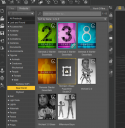
I am running Studio 4.24 on a PC with 32 Gig of memory and plenty of storage. I suddenly had trouble displaying all my models, especially recent ones. I tried reseting the work space, then I uninstalled and reinstalled the program. Still when I click on my new models in IM I get that they can't be found. When I open a folder as shown in the including image, all of my characters and Genesis 9 and 8.1 are missing. The program says I am signed into my account and I have not changed the password. Any thoughts?

Daz 3D is part of 
Connect
DAZ Productions, Inc.
7533 S Center View Ct #4664
West Jordan, UT 84084
Licensing Agreement | Terms of Service | Privacy Policy | EULA
© 2026 Daz Productions Inc. All Rights Reserved.
Comments
If you serach for a model you know you have in DIM, does it then come up blank in all tabs?
If you look for characters in your Content Library, are they also missing there?
Have you made any recent changes?
This is all I get when I use DIM. It doesn't even appear in the search blank at the top of product list. The resource error appears immediately with no request. I suddenly found my product list changed to only old stuff. I didn't intentionally change anything until the problem started. I first tried to reset the workspace and then reinstalled. I am able to bring up some Genesis 8 females by name. No Genesis 9 and no genesis 8 males. It is also showing stuff that normally doesn't come up. Like Michael 4 is on the system but never loads. It is like it went back in time. I can still call up previous scenes that contain the missing characters but spawn new ones. If you mean are all the models listed in DIM itself, yes. They all appear to be there. They are only missing in Studio as far as I can tell.
UPDATE...I tried uninstalling something I bought yesterday and reinstalling it. Now that product works. I hope I don't have to reinstall everything in DIM. what could cause Daz to forget everything beyond a certain point in time?
What you are showing is Daz Studio, not DIM. How are you installing?
I also asked how it looks in your Content Library, if you e.g. go under Daz Studio Format > My Daz Library (assuming you are using the default installation path) > People > Genesis 9 > Characters?
I am installing using Install manager. If I reinstall using Install Manager then the files come back into Daz Studio. I think this is what you want to see....This my content list in Daz...It look like it always did but when I go to People...nothing is there...Normally People would bring up everything and then I could refine the list...Is this what you are referring to?
This keeps getting weirder. I restarted Daz and now I can see the Genesis 9 Icon and choices but no special characters. not even the ones that come with it.
For whatever reason I can only see my recent files of whch there are a huge number, by uninstalling and reinstalling using DIM. My best description of what I am seeing is that DIM is not seeing anything before a certain date unless I reinstall. I appreciate you help, but it looks like a long day ahead! If it affects anything, I recently turned off Microsoft Co-pilot because it kept popping up while I was working. Could that affect it? It is the only thing I know of that changed. If I figure it out I'll post back. Gonna be a long day of reinstalling!
As a warning, Alpha builds are inherently unstable, expect things to break, in new and exciting ways.
Based on the issue, it's either your database is corrupted, your drive is failing, or you've got a virus.
The first thing to check, is if the files are on the drive.
Default install location is C:\Users\Public\Documents\My Daz 3D Library in windows.
If you've installed elsewhere, you'll need to check that path.
If the content is there, the database is probably corrupted.
RIght click on the Smart content tab and select Content DB Maintenance.
In the popup, check the Re-import Metadata box, and click accept.
You should see a list of all your installed assets in the next popup.
With all content checked, click accept.
This should bring back the content in the Smart content tab.
If the files aren't there, you may have a major issue on your hands.
I'd recommend using a disk checking utility to verify if your drive is failing or not.
If the disk checks out ok, then i'd run a virus scan just to be sure.
After that, you get to reinstall everything that's missing.
Edit: I'm an idiot that consistently breaks things in new and interesting ways.
In this case, carrying over a custom layout resulted in the "Show Tab Icons" and "Show tab text with icons" options to not be in the Window>Workspace menu.
Hence why i thought this was the alpha build.
What do you mean by "DIM"? You keep referring to it, but not showing it - and it doesn't show your own saved files at all. Please try to explain using the actual titles of the app or names of the panes you are using.
The opening post says it is DS 4.24
Content being moved to OneDrive could also be an issue.
Yeah, but the screen shots appear to be the Alpha build.
The tabs have icons not text.
I rarely mention this, as it doesn't seem all that prevelant with users.
Could just be me though.
Edit, never mind my studio layout had an issue that resulted in the option for icons on tabs to not be there in 4.24.0.3
All the files are there and I can reinstall them by double clicking. The library is on a secondary driv e with plenty of room. Thanks for list to check. I'm on it.
That comes from Show Tab Icons option being turned on....rather than specifically with 2025 Alpha.
Thank you! That fixed it. Virus scan negative 3 hours ago. I recently ran a health check on the computer and no issues showed. I removed Microsoft Copilot very recently and I am wondering if that may have messed with things. If it did I wonder what it was doing near my files in the first place. I don't use One Cloud or any online storage. The library is on a secondary drive that is not even half full so I'm hoping this is the end of it. You mentioned the "alpha build". I Normally let DIM alert me to updates. Is there a different build I should have? If so where would I find it?
Just to recap. Daz Install Manager never lost a file and showed everything as INSTALLED that should have been. The issue occurred in DAZ Studio forgetting what was installed and telling Install Manager it wasn't there. Once I started reinstalling things it appeared to reconnect Studio with the Library and things started appearing in the menu though many were not installed.just greyed out. Uninstalling and reinstalling with Install manager worked but was tedious considering the number of files. Your suggestion to fix the data base worked.
Yeah, my primary layout didn't have those options in the menu for some reason.
Switched back to CIty limits, and there they were.
And now i get to rebuild my layout from scratch.
See you guys in a couple days.
lol