Possible To Change The Images, Colour and Text in These Signs?
 n.aspros123
Posts: 341
n.aspros123
Posts: 341
Is it possible to change the Colour, Images and Text to something else?
I'm thinking of creating a custom notification with different pictures on the sign but can the same font and colour font text be used? A couple of characters will read the large sign in a scene that will be rendered.
These signs are from a set called Everyday Labels and Signs in the Daz Shop.
Thank you in advanced for your helpful replies.
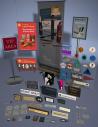
labels_pop01_1.jpg
615 x 800 - 71K

labels_pop04_1.jpg
615 x 800 - 68K
Post edited by n.aspros123 on

Daz 3D is part of 
Connect
DAZ Productions, Inc.
7533 S Center View Ct #4664
West Jordan, UT 84084
Licensing Agreement | Terms of Service | Privacy Policy | EULA
© 2026 Daz Productions Inc. All Rights Reserved.
Comments
Yep, certainly you can do it ~~ but you have to create / modify the images based on their texture maps in Base Color slots because they have the different UV layouts of their own.
Do you use something like GIMP or Paint to edit/change the Images, the colour of the sign and insert text of your own?
For one sign, Do all associated images in their slots need to be edited?
I use Adobe Photoshop to do so.
If you can find the texture maps in other slots, yea, you better modify them all to have perfect result. But if only one image in Base Color slot looks just fine, you also can simply remove the texture maps from other slots.
I ended up just making a square primitive. Inlarging it to 2500%. Created an image in paint.net and selecting that to Base Colour.
@crosswind I'll send a DM with it