Figure creation: When adding a bone the surface disappers
 Matze
Posts: 10
Matze
Posts: 10
Hello DAZ fellow artists,
I have made a figure from scratch (for the fun of it :-). I have rigged it in DAZ made weight maps and so on.
This is what I have done befor The problem occured:
I have found some glitches that I have made. Ther was a little asymetrie in the legs position an a hole in the skin.
So I corrected the Symetrie in Blender, using a shape key and I welded the polygon that has gone astray back into the proper position in the UV's.
Than I tried to update the base geometry (which worked, but all may morphs have vanished) -So I tried to undo that. (O.k. there is no undoing that, so I restarted in reloading the figure. Next I tried to load my redone UV set which ended with a error message (polycount mismatch).
Here comes my problem
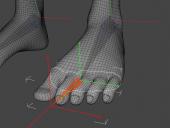
Next I went to the geometry editor and made some face groups for the individual toes.
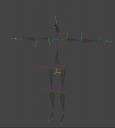
When I tried to add the first bone for the lBigToe1 the surface of the figure vanished.
This is what I see (the sceletion withe the new bone).
I guess I made a failor. The same behavior in DAZ Studio 4.24 and 6.25.
This even happens with an older version of my figure, so I can't go back to a previous version of my figure...
With other figures that doesn't happen.
Has anybody any idea what I can do? -to save my figure..


Daz 3D is part of 
Connect
DAZ Productions, Inc.
7533 S Center View Ct #4664
West Jordan, UT 84084
Licensing Agreement | Terms of Service | Privacy Policy | EULA
© 2026 Daz Productions Inc. All Rights Reserved.
Comments
Adding a new polygon (to patch the hole) is chnaging the polygon count and so it will cause a failure to load the UV set - though I would think Blender would preserve the UVs and so send them over with the new mesh. You could always uses the Transfer Utility to rig the patched mesh from the original, rather than trying to use the Update Base Geometry feature, and that way you could also transfer the morphs.
I can't really tell what is happening with the bone seelction group causing you to lose the surface (surface group or the actual geoemtry - the pictures imply the latter). If you have the Geometry Editor active and look at the lists in Tool Settings is the mesh still listed as complete?
Thanks for the reply! Good suggestion, with the transfer utility -I will give it a try and see if this will fix my problem with the disapperaering surfaces. And yes, the Face groups as well as the surfaces are still there, just not visible. I could even continue with adding new bones (but of cause without seeing the geometrie that would be pointless).
By the way, DAZ Studio is a great software. -The problem is caused by me..
I've tried different draw styles and reapplies the skin material, but to no avail.
I don't understand what you mean by "...but all may morphs have vanished"... Update Base Geometry (no matter with updating Full or vertex positions...) shouldn't touch any morphs you made on the figure ~
Anyway, if polycount of your stand-alone figure has been rebuilt / changed, you have to start over your rigging process with the updated OBJ no matter with TU or donor bone ~
I have no idea how the mesh turned invisible the momoment you just created a child bone... but you can check if any default face group is assigned to the bone and the bone is set hidden ~~ There shouldn't be other culprit that may bring you such invisible mesh with Joint Editor....unless you Hide the nodes / joints assigned with face groups.
BTW, the mesh on your figure seems too dense... that may bring you other troubles, IMHO.