Issue with Sukki Hair
 Anonymous Poster
Posts: 164
Anonymous Poster
Posts: 164
in The Commons
Anyone know what is going on here?
Never had this issue before
Hair in aux viewport looks great, hair in render looks - really greasy!
All other hairs seem to render okay?

Screenshot 2025-10-10 171458.png
659 x 555 - 688K
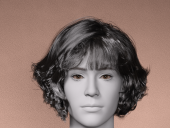
Screenshot 2025-10-10 171649.png
751 x 566 - 857K

Daz 3D is part of 
Connect
DAZ Productions, Inc.
7533 S Center View Ct #4664
West Jordan, UT 84084
Licensing Agreement | Terms of Service | Privacy Policy | EULA
© 2026 Daz Productions Inc. All Rights Reserved.
Comments
click on the hair(not the cap if there is one) in the scene tab. Then click on the parameters tab; check what the line tesselation is for viewport and render. They should both be set to 0.
Brilliant, thank you - never come across that one before!
Every once in awhile it sneaks through on a product. It's an easily missed thing :)
My issue with this hair is the location where DIM installs it:
"DriveLetter:\name\My DAZ 3D Library\People\Genesis 9\People\Genesis 9\Hair\Daz Originals\Sukki Messy Curls\Sukki Messy Curls.duf"
Does QA check anything?