Help. The Daz to Blender Export Option Box is too big for my screen
 BlenderRhino
Posts: 0
BlenderRhino
Posts: 0
I am new to Daz and I am working on a laptop. I am trying to export a vinyette from Daz to Blender Bridge and the Blender Export Box is not scalable. It is big and the 'Accept' part is below my task bar. I can't find any way to reduce its size to be able to click the 'Accept' button to proceed with the export. Anyone have any ideas on how to reduce this so I can proceed with the export? Thank you. Nathan.
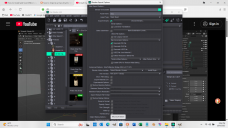
DAZ too big.png
1920 x 1080 - 629K

Daz 3D is part of 
Connect
DAZ Productions, Inc.
7533 S Center View Ct #4664
West Jordan, UT 84084
Licensing Agreement | Terms of Service | Privacy Policy | EULA
© 2026 Daz Productions Inc. All Rights Reserved.
Comments
Try clicking on one of the other controls, then hit tab until the highlight vanishes - with a bit of experimentation you should hit the Accept button
thank you for the suggestion. Nothing I tried allowed me to be able to hit the Access button. I was able to import the vinyette through Diffeomorphic, though.