Can't Log In To Daz Studio
 roninwolf109
Posts: 77
roninwolf109
Posts: 77
I have no idea what's going on here, but I can't log into Daz Studio. I ran a program to get rid of all the mulitiple files on my hard drive and now I get the pop up in the attachement below when I try to log in.
I've already tried uninstalling and reinstalling Daz Studio. What can I do here?
Thanks!
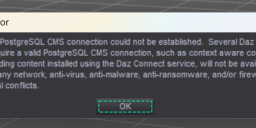
Screenshot 2025-10-08 081914.png
668 x 206 - 75K
Post edited by roninwolf109 on

Daz 3D is part of 
Connect
DAZ Productions, Inc.
7533 S Center View Ct #4664
West Jordan, UT 84084
Licensing Agreement | Terms of Service | Privacy Policy | EULA
© 2026 Daz Productions Inc. All Rights Reserved.
Comments
That has nothing to do with logging in to your account, it is wanting to communicate with PostgreSQL which it does using Internet Protocol on the local system. It sounds as if the utility deletd that which it should not have deleted - I would think a first step worl do to uninstall and reinstall PostgreSQL
How do I do that?
If you're using DIM, I would search for 'PostgreSQL' and 'PostgreSQL CMS' will likely be the only result.
If you did a manual installation, you should be able to get the installer here: https://www.daz3d.com/downloader/customer/files#prod_18869
If you installed through Install Manager thne find it in the Installed tab and click the Uninstall button, then find the same version in the ready To Download/Ready to Install tab (depending on whether or not you kept the package) and click the Download/Instal button.
You also need a Connect folder mapped in the Content Manager even if you don't use it.
If the program deletes empty folders then it may have deleted the Connect folder if it were empty.
With Studio running press F2 and on the bottom of the Content tab click the "Content Directory Manager" button and look to make sure "Daz Connect Data" is pointing to a folder that exists.
If the folder isn't there or the entry is blank then you can simply make a new one by clicking on "Daz Connect Data" and on the left side of the pane the word "Addd" will light up.
Click that and navigate to the location of your new Connect folder.
Okay, I've tried uninstalling and reinstalling PostgreSQL a few times and I'm still getting the same popup when I try to run Daz.
Here's what I see when I go into the Content Director Manager. It looks like I've got a folder there, or at least it takes me to a folder when I right click the Edit Base Directory.
That appears to be on onedrive
Keep that in mind because online storage of those files can be a headache.
I had the same problem you have so I moved mine to a different location and stopped using onedrive becasue of all the problems with file syncing and all that stuff.
I'm on Win11 Pro so I also disabled onedrive.
I never liked it and never used it, it was causing me nothing but problems.
It worked fine until I ran the program to delete a bunch of double files on my hard drive. Apparently something got deleted that shouldn't have been now I get the popup in the original post.
If you go to Edit>Preferences, then click the CMS Settings tab - are there entries in the text boxes?
I've got it fixed. Spent all day having to reinstall all my assets and, hopefully, my saved files weren't corrupted...
Thanks for the help, everyone!