Question about Wearable Presets - Answered, thanks.
 richardandtracy
Posts: 8,025
richardandtracy
Posts: 8,025
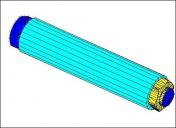
As a bit of fun for halloween I'm thinking of doing a neck/temple bolt to go through the neck/temple (obviously). The thing consists of a spacer tube the diameter of an M20 washer (37mm) and nut/bolt.
One thing I'd like to do is make sure that when the nut/bolt is invisible it's possible to see right through the central hole in the spacer - and through the character's neck/temple.
If I were to hide the neck/temple facets prior to saving the bolt as a wearable preset, would that get through to the character next time I/anybodyelse use the wearable preset? If not.. could someone make a suggestion? I could add in an opacity map through LIE - but it's not something I know how to add as part of a wearable.
Any thoughts?
Regards,
Richard

Daz 3D is part of 
Connect
DAZ Productions, Inc.
7533 S Center View Ct #4664
West Jordan, UT 84084
Licensing Agreement | Terms of Service | Privacy Policy | EULA
© 2026 Daz Productions Inc. All Rights Reserved.
Comments
Not sure if you mean hide corresponding facets on the character by using Auto-Hide with Geometry Editor... If you do, that'll always work when loading the Wearable Preset to the character... because Auto-Hide polygons (graft) is saved within the Wearable Presets. (or DSF file if you save the bolt as a Figure Asset.)
As for the way of adding an opacity map... you can define the item of LIE Preset in Post Load script when saving the Wearable Preset... only this way is a bit cumbersome IMHO.
Thank you.
I was meaning hiding the neck/temple facets with the geometry editor. I'll be saving the nut, bolt & spacer as a normal support asset with a bolt withdrawal morph and a spacer length morph, then saving as a wearable preset on different generations of character. Might as well make it usable on G2-G9 so anyone can have a bit of fun (do many people use G1?) and also for my TriAx V3 (probably not distribute that one). The hidden facets will need to be different for each generation and I only want to save a single support asset to keep the load on people's machines to the minimum. There are 684 facets and 516 vertices, so it's not excessive.
Regards,
Richard
Well, it won't work without using Auto-Hide. Hidden surfaces set with Geometry Editor will be reset after the scene is reopened.
You assign the geometry to the AutoHide group for fitted figures, then select the item you want to trigger the hiding. You will need to switch to a non-content creation tool to see the effect.
Yeah, but your case may be more complex as you need a sort of hole, let's say, on the temple. If you go for the way of manipulating geometry / facets, the topo on the head of Genesis figure doesn't support that. You have to firstly make a temple geo-graft with a hole on it. Rig it to Genesis figure with Auto-Hide. Then set a Conditional Graft on the temple geo-graft, and ERC link it to the bolt's Transform or Visible.
So with this way, you may be to use a geo-graft with Auto-Hide plus a Conditional Graft on it. A quick example as shown in below screenshots ~
But if you don't wnat to go for modeling the geo-graft, setting with a Opacity Map with Post Load script or just with Material Presets... is also doable.
Thanks. I did manage it without a geografts, but it was getting into that territory. If the spacer thickness hadn't been the diameter I was using, it would have been necessary.
It does appear that I'm going to have to do one for each generation though. The auto Hide only works if it's rigged for the generation character. Ahh well.
Regards,
Richard
Unfortunately Auto-Hide only works with graft technics... which have to work on Figures rather than Props. And yea, even if you were making Smart Props, you would need to make separate Smart Prop for each Genesis gen ~~