SY Faceless
 jmucchiello
Posts: 2,540
jmucchiello
Posts: 2,540
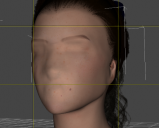
https://www.daz3d.com/sy-no-face-genesis-9
The documentation says there's "SYFN9 00 Faceless Genesis 9 APPLY ALL" in "People/Genesis 9/Characters/SickleYield/No Face Genesis 9" but that doesn't exist in my install. In fact there are 5 items in the PDF image and only 3 in my content library.
There's supposed to be an earless asset. I don't see it.
EDIT: I didn't realize it installs into two separate places. However, it isn't easy to use at all as skins don't necessarily line up. For example, I have no idea what's causes the splotchiness around the missing mouth

Daz 3D is part of 
Connect
DAZ Productions, Inc.
7533 S Center View Ct #4664
West Jordan, UT 84084
Licensing Agreement | Terms of Service | Privacy Policy | EULA
© 2026 Daz Productions Inc. All Rights Reserved.
Comments
I'm trying to figure out how to get rid of the mouth texture, tried Dain 9 and Victoria 9 both.
I don't think this product was meant to be made for being used with the characters' original texture maps (Head) ~~
I'm afraid your best option might be retouching / healing the texture map with external image Editors... to remove partial textures around the mouth area ~~
Hi! Did you apply the blend layer from Anatomy? Its purpose is to cover up the original face textures.