How to isolate part of a full body morph and apply it
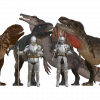
I was thinking of buying the Oso Mosasaur morph for the Daz Dragon 3 and partially morph it's limbs to get something like this https://share.google/uyGdfW3uaGVxWoxiE and make a sea dragon. The thing is that the mosasaur is a full body morph and I don't know how to isolate part of it and apply just on the body parts I want. Does anyone know how I can do it? Maybe any tutorials?

Daz 3D is part of 
Connect
DAZ Productions, Inc.
7533 S Center View Ct #4664
West Jordan, UT 84084
Licensing Agreement | Terms of Service | Privacy Policy | EULA
© 2026 Daz Productions Inc. All Rights Reserved.
Comments
The problem is that it isn't just the shape - the rigging has to be adjusted so that the bends are happening inside the joints, at the correct height relative to the weight maps, and with radical reshapes there are likely to be corrective morphs for bends and to make sure other (supported) morphs and adjustments (e.g. expressions, such as eyelids meeting when closed) work. Splitting a morph would entail splitting all those things too, and in many cases might require a completely new morph (for example, if you want to isolate a head morph when the neck has changed angle or length then you will need to move the ehad to line up with the default neck and probably add some kind of transitional shaping to make the join look plausible). It's possible in principle, but more than you can expect from a product and a lot of complex work to DIY.
Actually you can do it with a D-Former + weight mapping.. I'd rather do it with Royal Dragon's body morph rather than Oso Mosasaur ~~ by using Attenuate option with Morph Loader Pro, i.e. only update Dragon's body.
With SD morphs, and it will still be an issue fixing the joins and (at least for dForm plus weight mappng) redoing adjustments and corrections.
The trick is to optimize weight mapping before using Attenuate with MLP. Then, as usual when creating FBM, just do Adjust Rigging to Shape before ERC Freeze.
Then I tested with key joint rotations, so far so good. If there's any ugly bend, just fix the pjcm / mcm.
Oh, still the same way ~