Question about PBR Skin textures
 Blando Calrissian
Posts: 668
Blando Calrissian
Posts: 668
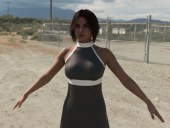
I picked up Justina HD and Expression for Genesis 8 and 8.1 Female the other day. This is the first Lyoness figure I've purchased that has PBR skin materials. Unfortunately, this is also the first time I've ever had to think about tweaking a PBR skin out of the box. Her skin has a reddish glow in spots (see photo). I know with Uber skin textures you can sometimes adjust the translucency and/or the transmitted measurement distance to make things better, but that doesn't seem to be the case with PBRs.
(for reference, in the attached photos: the HDRI is Dimension Theory's Platinum Pack Outdoor-A (8K); dome rotation at 221.42; F/stop 10; ISO 200; EV 16; camera with headlamp off)
Daz Studio 4.24
Figures are Justina 8; Mousso's Ginny 8; and HID's Sonia 9. All are 'out of the box' default skin textures.



Daz 3D is part of 
Connect
DAZ Productions, Inc.
7533 S Center View Ct #4664
West Jordan, UT 84084
Licensing Agreement | Terms of Service | Privacy Policy | EULA
© 2026 Daz Productions Inc. All Rights Reserved.
Comments
The 1st image seems a bad out-of-the-box settings on character's skin surfaces. You can try:
- Go to Surfaces pane, select Skin set, reduce Transmitted Measurement Distance to a much smaller value, e.g. in between 0.010 ~ 0.025.
- Or, turn on SSS Enable, set a redish color in SSS color;
- Finally, gradually reduce the value in Translucency Weight to have an acceptable result of skin color / tone.
wow. that looks really crappy. I wonder what happened.
seems to me that a gamma setting got mixed up.
Lemme see if I can duplicate your out of the box error.
Ok. I see what happened.
The SSS just seems to have been clicked off and won't automatically turn back on.
So what you need to do is go to the surfaces tab.
Select Justina
scroll to the bottom and click on SSS Enable.
Click it on and everything will be fine.
The surfaces tab that I've pictured show that I've selected "skin". You do not need to do that, you want all the g8 elements to have SSS enabled.
That will fix your problems and have everything work perfectly.