[Solved for G9] Strandbased Very Short Pixie hair not following the head of some characters
 Elor
Posts: 4,106
Elor
Posts: 4,106
Edit October-12-2025: I just saw that an update was pushed for this product and after testing it with the morph I created removed, the hairs fitted Hanako 9 perfectly without it.
Hello,
I'm speaking about this product:
https://www.daz3d.com/dforce-strand-based-very-short-pixie-style-hair-for-genesis-9-and-8-female
I tried to fit it on Hanako 9 (the problem does happen with other characters), and the hairs ended inside her head…
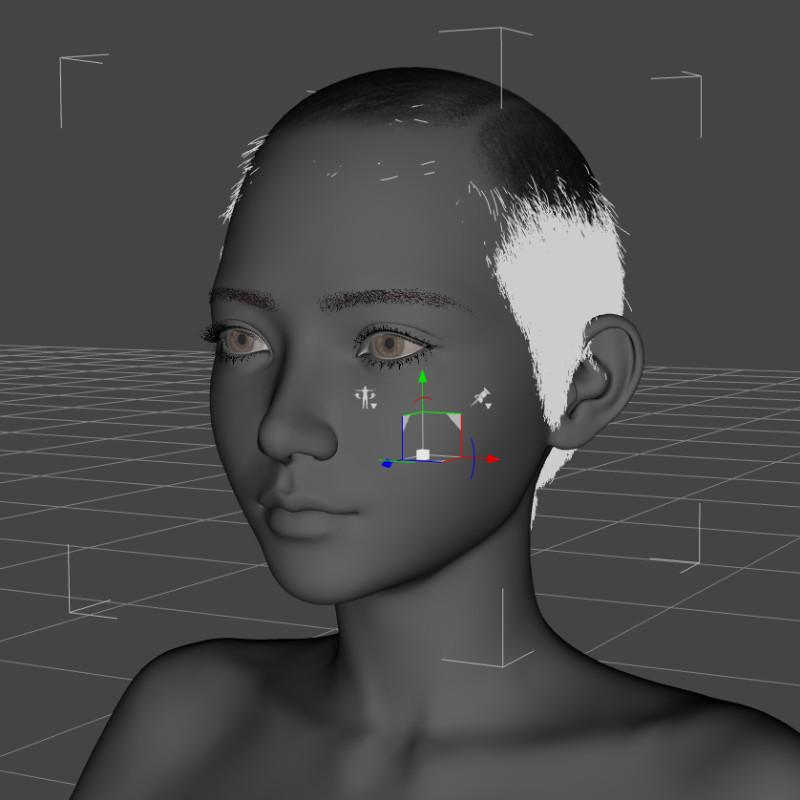
It seems to be mainly linked to her proportion slider:

What's strange is that the cap itself is following her head perfectly, as shown on the following screenshot in Iray preview: it's the strandbased part of the hair that doesn't follow the shape of the figure. Isn't that part supposed to follow the cap itself?
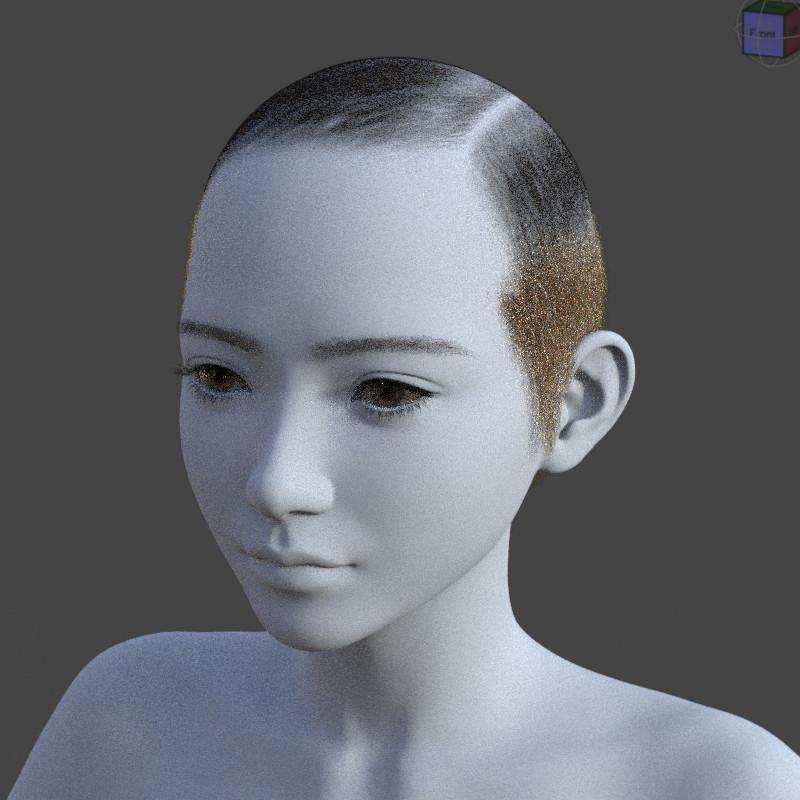
Does someone know how to solve the problem?


Daz 3D is part of 
Connect
DAZ Productions, Inc.
7533 S Center View Ct #4664
West Jordan, UT 84084
Licensing Agreement | Terms of Service | Privacy Policy | EULA
© 2026 Daz Productions Inc. All Rights Reserved.
Comments
Usually the vendor has no way to provide fixed FHMs for all characters... You're right, in this case the culprit seems to be Proportion Neck Length.
How to fix:
1. Select Hair Strands node, Show Hidden Properties in Parameters pane, set head_bs_ProportionNeckLength to 30%. (ss1)
2. With Geometry Editor, export Hair Strand to OBJ by using the file name : Hanako9_head_bs_Head. Alt + Click head_bs_ProportionNeckLength to reset it to -30%.
3. Import OBJ to Hair Strand with Morph Loader Pro to update auto follow FBM : Hanako9_head_bs_Head, as usual by using the options: Reverse Deformations: Yes; Overwrite Existings: Deltas Only. Save Hanako9_head_bs_Head as a Modifier Asset. (ss2)
Fixed. Alt Shift + U. Now remove the hair and reload it. It'll work. (ss3)
Edit: It's the standard way to fix FBM. Still, the simplest way is to just parent such a short hair to the head instead of fitting it ~~
Thank you :)
I was able to solve the problem with Hanako 9.
I tried to save a morph for head_bs_ProportionNeckLength but was not succesful. Is there a trick to be able to do so? At worse, I'll continue to fix character when a problem happens but I thought that fixing the neck morph could maybe solve every other characters?
Yes, you certainly can fix head_bs_ProportionNeckLength at the first place. Not sure how you did it, but you need to do it on a G9 Base, then dial Proportion Neck Length to 100% before fixing.
- Dial head_bs_ProportionNeckLength on the root node of the hair to appr. 50%, export Hair Strand to OBJ. Ctrl + Z.
- Import OBJ to update head_bs_ProportionNeckLength on Hair Strand. Save the Modifier Asset.
However, only fixing head_bs_ProportionNeckLength is not 100% perfect for Hanako, you still have to further fix her FHM : Hanako9_head_bs_Head ...
I didn't change the head_bs_ProportionNeckLength on the root node but directly on the strand based and I suppose the influence from the root node was messing with what I was trying to do.
I'll try your solution later today :) Thank you again!
Ah, that's also doable but don't zero it 'cause it'll bring it no deltas, just give it a very small value like 0.1 ~ 0.5%. It'll work as well.
Thank you :)
I'll try another day because even on my most powerful computer, creating the morph from a 30 MB .obj file takes between 5 and 10 minutes.
You're welcome !
Yea, OBJ file size was around 28MB... but it took less than 30 seconds to finish the import on my side. Not sure why it takes so long on your side... IIRC, Mac ?
I'm creating morph on my Mac, which has an M1 Pro CPU, likely more powerful than the Core i7 4790k I have inside my PC.
An update was recently made available for these hairs and after installing it then loading the hairs on Genesis 9 with the morph I created for Hanako removed, everything worked perfectly.
I didn't open a ticket, maybe someone did, maybe Outoftouch saw this discussion, regardless of the cause, thank you very much, Outoftouch, for fixing it
I have the same problem with Genesis 8 with character who are shorter than Genesis 8, some who are using scaling as part of the shortening process, other, like the first one I tested, who simply have a morph of a character smaller than Genesis 8, and I don't understand why: 'Very Short Pixie Style Hair Strands G8' doesn't fit as it should while 'Very Short Pixie Style Cap G8' fit perfectly
Here an example with Sarah by CGSerpent (which was free a couple of months ago), sold on Renderhub (no link because they are NSFW user renders on it visible by default):
Removing the auto-generated morph on 'Very Short Pixie Style Hair Strands G8' seems to solve the problem:
I tested with other characters, including Daz Originals like Victoria 8.1 or characters sold here to remove the possibility that CGSperpent did something wrong while creating the CGS Sarah Head and CGS Sarah Body dials, and the problem does happen with pretty much all of them to some extend.
The same problem doesn't seem to happen to another strand based hair by Out of touch:
Does someone know how to solve it ?
Something I didn't initially see: if you're applying the 'fix' I'm speaking about (dialing down to 0 the body and head morphs for 'Very Short Pixie Style Hair Strands G8'), it's possible your scene files will be much bigger than they should and as a consequence, much slower to save: I saw the problem today while opening a ticket to report the problem and a scene with a Genesis 8.1 dev figure wearing only the hair (with nothing else in the scene) was ~10 times bigger when saved with the 'fix' applied.
Correct. That's the default behavior in DS... If you do the same thing on other conformers, e.g. garments, geo-grafts, the "zeroed deltas" will be saved within the scene file.
So in such a case, you can uncheck Auto Follow in Parameter Settings of Body / Head morphs on the hair strand... or directly delete Body / Head properties in Paramters pane before saving the scene file, then the file size won't be changed.
I didn't know that so thank you: it'll fix the size problem while waiting for a fix of the overall problem.