Exporting an object - with lights?
 Roderickandara
Posts: 8
Roderickandara
Posts: 8
Hi there,
I#m trying to export a Spaceship made by some parts of a Ship builder.
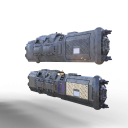
Here you ca see ist - the lower ship ist made directly by the ship builder, a group of several hundreds of objects, which makes them difficult to handle, so i decided to export the whole group and any of the objects in it to a single file.
But by reimporting ist, the lights are off (the upper ship).
What am I doing wrong?
thanks and greetings
Nik
Schachtschiff obj Test.png
1080 x 1080 - 890K

Daz 3D is part of 
Connect
DAZ Productions, Inc.
7533 S Center View Ct #4664
West Jordan, UT 84084
Licensing Agreement | Terms of Service | Privacy Policy | EULA
© 2026 Daz Productions Inc. All Rights Reserved.
Comments
OBJ is a very simsple format, it doesn't iclude lights or a lot of material options - including emission. You will, I am afraid, need to reapply the advanced settings for surface properties.
damn. Thank You. :)
The obj file format can be very simple (most cases), however it can be very complex - only a few applications allow for all the complexities. See Paul Bourke's explanation of the file format here and the material library options here. (these descriptions are very detailed). The obj import & export implementation with DS tends towards the simpler end of the scale.
Regardless of the complexity of the implementation, the format does not seem to include ways of defining emission of light from a surface. So.. you simply can't do it that way to/from DS without work at either end. Shame, though.
Regards,
Richard
Remeber that the DS OBJ importer is part of the PZ3 Importer library (.dll/.dylib), as you can verify by disabling that through Help_About Installed Plug-ins, and is geared towards the features needed for Poser content. The SDK is available (for DS 4) for anyone who wished to write a more general-purpose one
If you have are going round trip from Daz -> obj -> Daz, once back in Daz, you should be able to reapply the shaders by copy and pasting each surface from the original to the new model.
Don't forget that this is apparently several hundred objects. That is a lort of copy/pasting, especially if the surface names have had to be changed to keep them adjustable (to compensate for different scaling, to allow for special settings in certain areas such as the missive panels, etc.). I am not sure there is an easy way to collapse the asembly into a single item with complex materials preserved or readily transferable.