problem with interface
 rfaraino
Posts: 0
rfaraino
Posts: 0
Hello,
I get this bug that happens with my left side panes. When I open the tabs, the tabs open cut off, so I cant access the numbers on the right, and the tabs no longer show so the pane can not be closed. I keep having to reset my workspace, which get annoying. I attached images. Is there a fix. Thanks
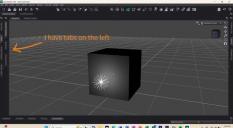
prnt_scn_01.jpg
720 x 395 - 47K
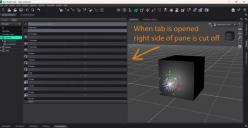
prnt_scn_02.jpg
720 x 372 - 49K

Daz 3D is part of 
Connect
DAZ Productions, Inc.
7533 S Center View Ct #4664
West Jordan, UT 84084
Licensing Agreement | Terms of Service | Privacy Policy | EULA
© 2026 Daz Productions Inc. All Rights Reserved.
Comments
That usually means one of the docked panes has a minimum size that is larger than the available space, though with the reduce image size I am not quite certain what is docked where (you should be able to attach fuill-sized screenshots).
It looks like there is timeline, and I assume that that is the culprit.
Yes, the pane is larger than the space. If I undock the viewport the hidden pane tabs are behind it. How do you set the minimum size? Though it's buggy. if I refresh enough times the panes open fine, then all of a sudden they dont.
You may simply be trying to fit more into your available screen width than will fix, and depending on which panes are active in each well there may be underlapping. I don't think this is a bug per se - just asking the application to do something it can't.
It doesnt seem like my replies are posting. Yes, my panes are openning too wide. They dont need to; there's plenty of room
It was working all day just fine. Something is bugging the left side. See attackment
So what I did was I relaoded the CityLimit layout, made some minor tweaks and saved over my old layout preset. It seems to be fixed now. Thanks for trying to help
Please stop posying downsized screenshots, it makes them much harder to read. Since you didn't post images of the revised layout we can't see what the difference is.