Motion Blur in iray How?
 myotherworld
Posts: 664
myotherworld
Posts: 664
Having never had a need for it in Daz iray, I have never tried to use/do it. believing it could be done in Daz Studio Iray.
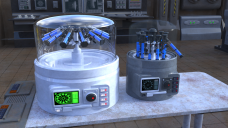
So I have a set of images in mind of a lab scene where someone is using a Centrifuge and wanted to show it spinning.
After kitbashing one by Dystopia, (my kitbashed monster is on the left in image, still some work to do on it) the original wouldnt let pose the test tubes faned out, also the base was not big enought for the test tubes to be at angle. There was a lot more to it than just changing the scale. Anyway alls good, i think. Ready to render
After all motion blur can be done in Poser (way back in Poser 5) and it can be done in 3Delight, so why not Iray, I was thinking. WRONG.
Anyone know if/how it can be done in Daz Studio Iray.

Daz 3D is part of 
Connect
DAZ Productions, Inc.
7533 S Center View Ct #4664
West Jordan, UT 84084
Licensing Agreement | Terms of Service | Privacy Policy | EULA
© 2026 Daz Productions Inc. All Rights Reserved.
Comments
You might find some useful suggestions in this thread.
Iray I have heard supports motion blur but Daz Studio does not (correct me if i am wrong someone). all the solutions i have seen so far involve using an animation to create a load of frames whith are then combined and look more like a stroboscopic effect rather than motion blur.
The best results I got was using photoshop to be honest if there is a way to truely do it in Daz Studio I would love to know.
This is the helicopter from https://www.daz3d.com/mountain-rescue-helicopter i renderd the rotors seperately and blured them in photoshop and got this result.
There is a prop product from Marshian that does this, otherwise to my knowledge it is best done in post - but the Marshian product looks very good although it is a reasonably old product so perhaps weigh up whether it still works, I think it appeared to me that it would - it also definitely had variants of the prop that were specifically helpful for spinning wheels, with reference promos too. Aside from that I would try an animation sequence with ABAS or texture animator, light reflected off the surface you want to spin, plenty of bloom so said light blurs out colourfully and if the final work has to be a still. I would pick the best frame or composit a few in said area of the piece. I mean these things are often rendered seperately and largely honed in post in hollywood SFX so surely that should be good enough for us humble Daz user's? But again, if you want to stick to the one render dream, the Marshian product does look useful for exactly this kiknd of thing...
Blur Crazy | Daz 3D - Marshian - currently on sale too
thanks all.
I do have a few ideas of how to may be do this, I will give it a go and see what I get.
I bought Motion Blur for Iray a year ago - https://www.daz3d.com/motion-blur-for-iray . I haven’t dabbled with it much but when I have, it was more complicated than I wanted it to be. It comes with a PDF manual.