How to fit properly some clothing using Mesh Grabber
 Halcon Bluesky
Posts: 744
Halcon Bluesky
Posts: 744
Hello, I have this problem.
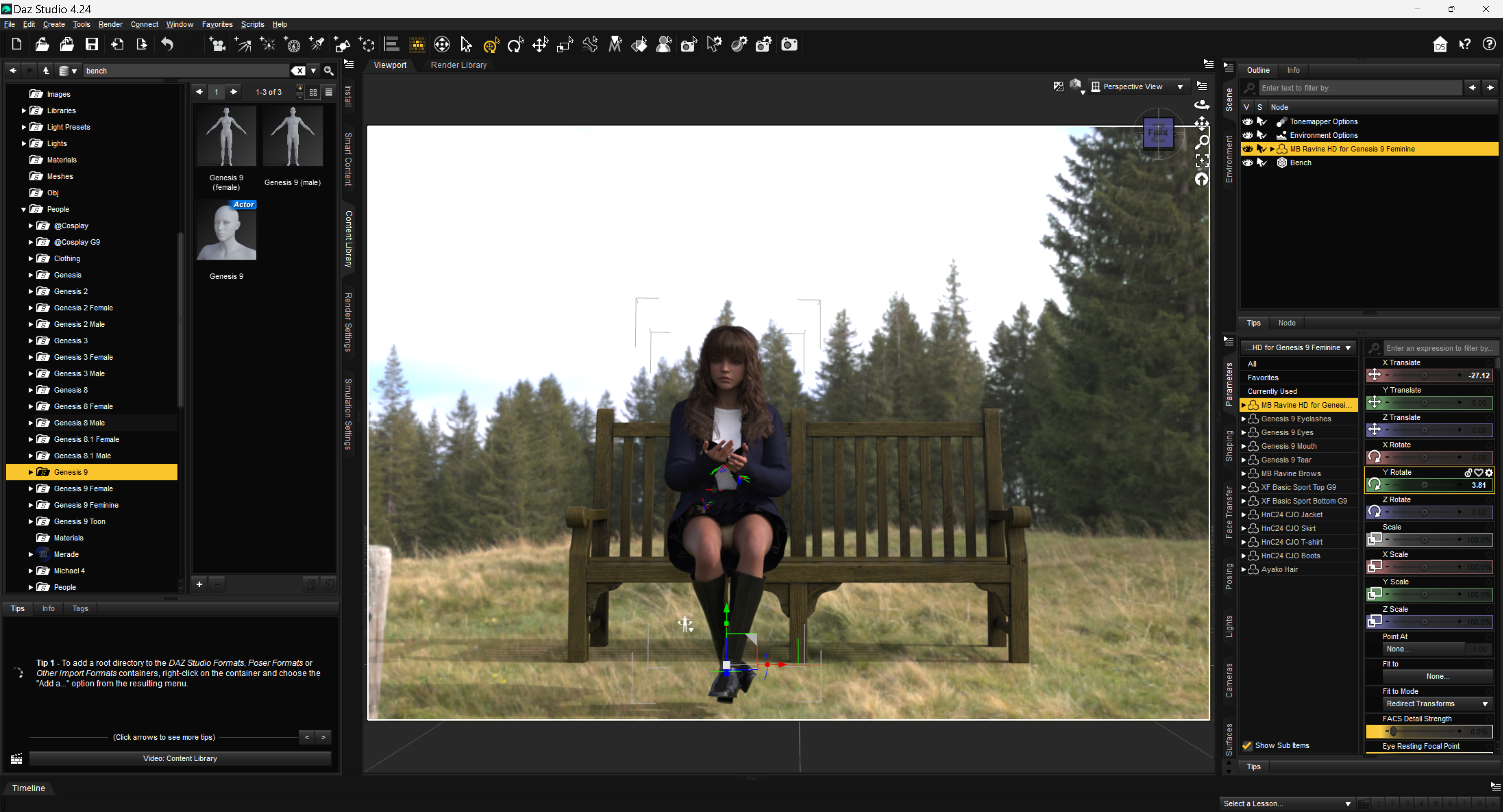
I am trying to fit some ladies clothing in a seated position.
Not all clothing offers adjustments via Shaping Tab in Daz Studio.
I am using the current build 4.24 Windows 64-bit
Here are the items used as an example for this post, please note that not all of these items have been applied some Materials.
Genesis 9 Character “MB Ravine HD for Genesis 9 Feminine by Magic Brush”
Genesis 8 hair “Ayako Hair by goldtassel”
Clothing set “dForce HnC24 Casual Jacket Outfits by DAZkang”
The skirt gives me some headache trying to fit in the position.
The same happens with any other Genesis 9 figure.
Underneath is the “X-Fashion Basic Sport Lingerie by xtrart-3d” Yellow
The prop used is the “Premium Props - Park Bench by MindVision-GDS”
I have used “Z My Favorite Book by Zeddicuss” Genesis 8 Poses for F/M
Unfortunately, I didn’t added the book to the scene, as is cumbersome to get into the exact position when using a Genesis 9 character, even thought is a prop.
Added a HDRI from PolyHaven
I have Mesh Grabber Bundle, it comes with
Mesh Grabber for Daz Studio 4.5+ (Win64-bit)
Mesh Grabber Morph Edito for Daz Studio 4.5+ (Win64-bit)
Mesh Grabber Rotations AddOn for Daz Studio 4.5+ (Win64-bit)
Now I want to make use of it to try fixing the clothing issue.
However, I don’t know how to start with.
I am not a fan of searching useless videos, that will not get me where I need to do.
Just get me the know-how to get the things done.
I would really appreciate your input with some examples I can follow.
Thanks beforehand!

Daz 3D is part of 
Connect
DAZ Productions, Inc.
7533 S Center View Ct #4664
West Jordan, UT 84084
Licensing Agreement | Terms of Service | Privacy Policy | EULA
© 2026 Daz Productions Inc. All Rights Reserved.
Comments
The skirt is dForce, so you can just simulate it with the bench participating in the simulation.
You will probably get best result using timeline for simulation, so you can do the movement in steps.
Before using dForce you will have to have your figure sitting on the bench. At the moment she is floating in the air, you can see that by looking at the shadows of the bench and the figure :)
Right ~ this is a typical case that you can firstly simulate the clothing which is dForce ready, then fix the partial area of the clothing with Mesh Grabber... as needed.
The trick is: 1) simulate with a Timeline; 2) make the Bench properly move in under the skirt so as to make a natural collision.
I made a scene to do such a simuation, and fixed the left corner of the skirt a bit after simulation ... with Mesh Grabber. The scene file is attached down below. The Bench prop I used is from: https://www.daz3d.com/enclosed-side-garden
If you don't have it, after opening the scene, you can select the Bench Prop, save a Pose Preset with animated range, then load a Bench you have, apply the Pose Preset to it, tweak the tranlate value on Timeline as needed....
Besides, the settings on dynamic surface of HnC24 CJO Skirt is not really good for this case. I tweaked the settings. You can apply the Material Preset I attached to the skirt before simulation.
Edit: RiverSoft Art ever developed a Script for such cases, you may take a look if you'd like to : https://www.daz3d.com/dforce-assistant
I myself always make it with the way I showed in the Scene file. It's been working well.
felis I haven't got experience with the simulation, but if I can I will try
Fishtales Well I have tried my best in doing a "quick" test render, not the one I intend to work with.
Sure there is always a big flaw, you see, the figure is floating, always I run into some silly mistakes, it takes time to fix it properly.
Ah crosswind I have never done a simulation.
I have to admit I wanted to do things on the rush, I will see how things go with the pose preset and try to use it with the bench I have.
Sometimes when I place the characters and look at them, is like they are stuck in the bench surface or as if there is a poke-thru, that makes me uneasy when working on a scene.
I will work with my project again and see if there anything I can do better.
What ?! Never did a simulation ? Oh, you must give it a try my friend ~ otherwise making good render with natural effects will be cumbersome ~~
You certainly can make it with Mesh Grabber only... but the process will be tedious and challenging.
crosswind I only did an initial render process and see how things are going.
Cancel and trying to zoom it, unfortunately the zoom tool does not work for me, I have to scroll the mouse wheel to get a better view.
If perfect, a final render.
If not, doing another test render and try to figure out how is going to be made better.