New update messed up the camera!
 editnyikes
Posts: 16
editnyikes
Posts: 16
I am unable to add a camera to a scene! (I am able to add a camera to a new/empty scene but not to a already made one) I get a Input Error saying A node labeled "Camera" already exists in the scene. Adjustments have been made. Verify the adjustments and try again.
This happened after the new update. Please help! How do I fix this!
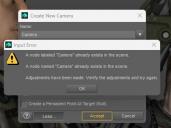
Screenshot 2025-08-19 104014.jpg
422 x 315 - 31K

Daz 3D is part of 
Connect
DAZ Productions, Inc.
7533 S Center View Ct #4664
West Jordan, UT 84084
Licensing Agreement | Terms of Service | Privacy Policy | EULA
© 2026 Daz Productions Inc. All Rights Reserved.
Comments
If you have a camera (named Camera), it should normally just add a number.
What happens if you give the created camera a different name and label?
But I don't know why it can happen.
Meanwhile, Shader Mixer is generating cameras instead of assigning shaders to surfaces
You cannot add a camera with the Label that already exists in the Scene. DS detects the Labels from existing cameras and automatically add a suffix number to the newly-created one. If you manually type in a duplicated Label, it'll pop up that error message ~~
There is no camera in the scene but it still saying that is one!
Something in the scene causing the camera to mailfunction. I am making a colonial marine and I noticed that with some of the characters, for some reason the camera won't work. Not sure what causing this but it's very annoying. Any ideas?
I figured it out! The issue is the tactical helmet! When I removed the helmet (male of female version) the camera came back! I'm not sure why the helmet causing this but if someone knows something please advise. Thanks.
Does the helmet have a camera parented to it?
Okay, the helmet has a sub-node Named and Labelled as "Camera".
You can modify them in Joint Editor... as e.g. "Helmet Camera". Then Add Camera...(4 the first time...) will work with no warning message ~~
Where can I find this window?
Select Joint Editor Tool, select the Camera bone in Scene tab, and rightclick in viewport Edit > Rename Node.
I don't have a "rename node" when I right click in the scene tab on the camera after selected Joint Editor tool.
The only node I see is reorder.
Right-click in Viewport rather than Scene tab ~~
Thanks felis, I got it!
Thanks crosswind, I got it!