Daz 4.24 to Daz 6.25 comparison - Texture Shaded
 mathiasdeckman
Posts: 113
mathiasdeckman
Posts: 113
So I've been using Daz Studio for a number of years and I started at version 4.10 briefly before going to 4.11. I really don't use a lot of the advanced features because I don't have a need for them and I was only really after the still image rendering for characters for books I write. Going through multiple different versions from 4.11, I've always seen a consistent texture shaded viewport and became acustomed to it's quirks and how it operates. Up to 4.24.0.3 Beta / Official / Pro, whatever, the it's always stayed consistent.
I fire up Daz 6.25.2025.11417 and I immediately notice that Texture Shaded is different. I first tested this on my laptop because I didn't want my main install to get borked.
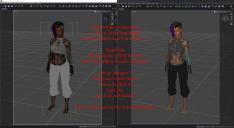
Today, I wanted to see if the texture shaded viewport was back to 4.24 scheme or if this was the new way. Attached is a screen shot of Both Daz 4.24.0.3 Beta compared to Daz 6.25.2025.22607.
What changed to make the style change color scheme? Why are the eyes black?
And what, if anything, can I do to change it back to 4.24.0.3 style?
If this has been addressed somewhere else, please provide a link so I can understand. If this is something under the hood, concerning the new Iray stuff from Nvidia, provide a link so I can understand. I simply want to know what changed and why and if there's a means to change it back.
If you're able to write out a few paragraphs explaining this change, go for it.

Daz 3D is part of 
Connect
DAZ Productions, Inc.
7533 S Center View Ct #4664
West Jordan, UT 84084
Licensing Agreement | Terms of Service | Privacy Policy | EULA
© 2026 Daz Productions Inc. All Rights Reserved.
Comments
Texture Shaded has been overhauled, but I don't get the black eyes - which figure is that, and does it depend on the materials?