Geometry Sculptor not working
 gsil247
Posts: 231
gsil247
Posts: 231
Hi all. So I loaded up Daz today and an outfit dildn't fit 100% so I tried using the Geometry Sculptor as I have before. I'm not sure what is wrong with it, but I can't use it like before. My mouse cursor doesn't even change to the option as it did before as it just stays the exact same as if I'm using anything other than Daz. What am I doing wrong or what changed?
Edit: I took a screenshot of what I'm seeing.
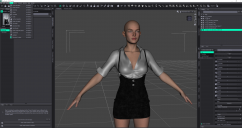
Screenshot (4).png
3821 x 2020 - 2M
Post edited by gsil247 on

Daz 3D is part of 
Connect
DAZ Productions, Inc.
7533 S Center View Ct #4664
West Jordan, UT 84084
Licensing Agreement | Terms of Service | Privacy Policy | EULA
© 2026 Daz Productions Inc. All Rights Reserved.
Comments
Which Selection mode and Brush are you using with Geometry Sculptor ? Can you open Tool Settings pane to take a look ?
BTW, Geometry Sculptor in DS 4.24 still has quite a few bugs ~~~
Good sir/ma'am, I owe you a beer. I didn't even know Tool Settings was a thing and once I did, I just played with it and started experimenting. Now I love Geometry Sculptor even more now that I have seen these settings and all the different things I can do with it. I did manage to get it back to how it was before all this and what I'm use to. Now the creative juices are flowing and I have even more ideas than before. Thank you so much and in case anyone is having this issue, these are the settings I am using.
Sounds great ! You're welcome !