Bring back old RGB axis colors in new DAZ Studio interface?
 MaX Pupkin
Posts: 49
MaX Pupkin
Posts: 49
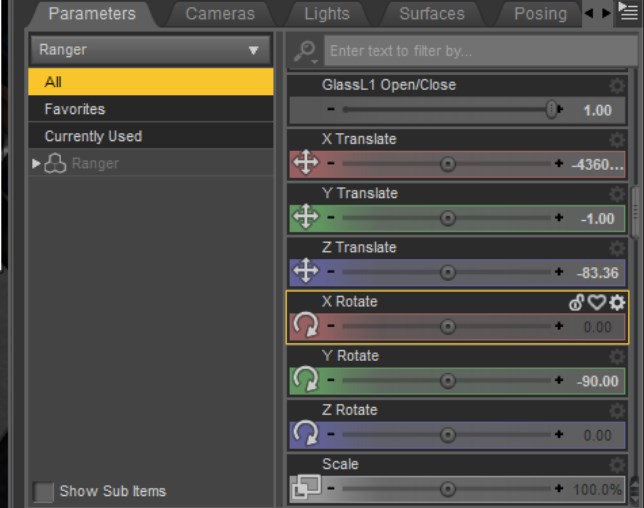
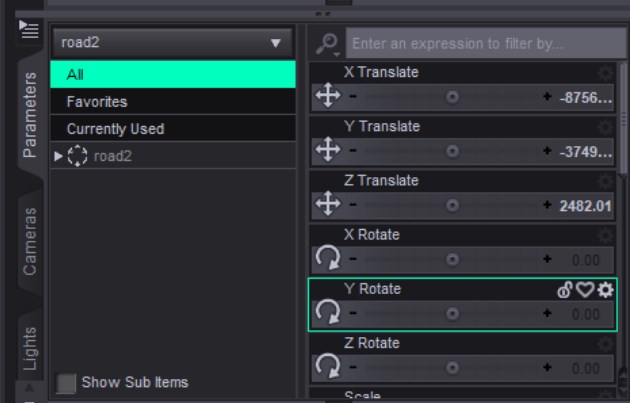
Hi everyone,
In older versions of DAZ Studio, the X, Y, and Z parameter sliders (Translate/Rotate) had distinctive red, green, and blue colors, which made it much easier to work visually. In the newer interface, these colors are gone, and I find it harder to navigate without them. Is there any way to restore or customize these RGB axis colors in the current version of DAZ Studio? Maybe through a theme, style settings, or editing configuration files?

Daz 3D is part of 
Connect
DAZ Productions, Inc.
7533 S Center View Ct #4664
West Jordan, UT 84084
Licensing Agreement | Terms of Service | Privacy Policy | EULA
© 2026 Daz Productions Inc. All Rights Reserved.
Comments
In DS, go to : Window > Style > Customize Style..., under 5. 3D Axis, you can tweak axis colors there
Alt/Opt-click will restore the default values (this is a non-default colourway, Midnight, on the Darkside style).
thx, bro!!!!!!!!!!!!!!!

but so far they seem to go away with each new alpha
They reset after you restore them?
TY!
It'd be nice to have these in the viewport as well. I always have to stop and think about the Up Axis, or which is forward, out of the screen relative to Blender. If it just showed the colors (which are probably indelibly burned into all of our brains) in the viewport, I'd immediately know.
Can this be configured?
Which This? The Viewport tools use the same colours