[Released] Bone Minion Batch Converter for Genesis 3 Poses [Commercial]
 RiverSoft Art
Posts: 6,968
RiverSoft Art
Posts: 6,968
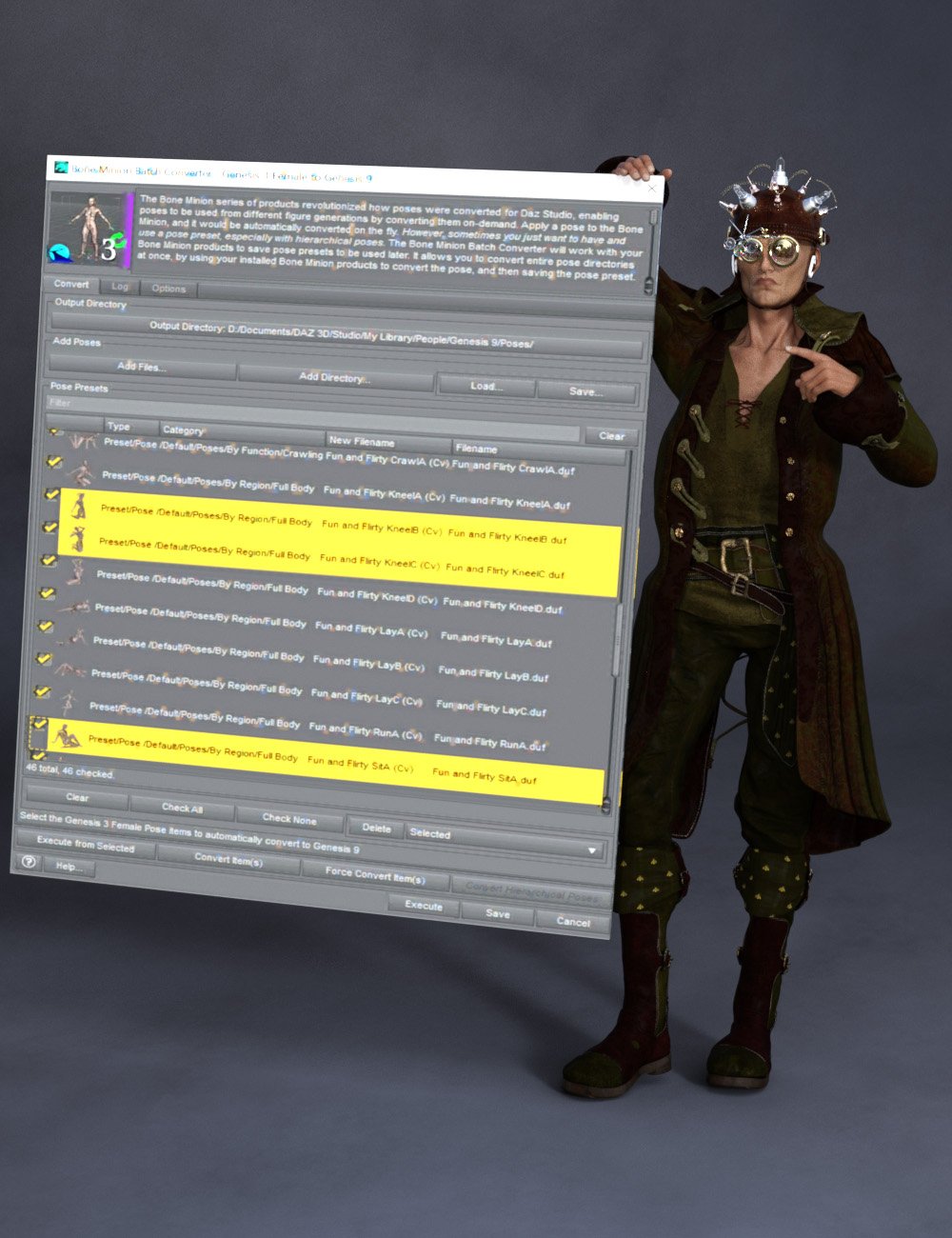 The Bone Minion series of products revolutionized how poses were converted for Daz Studio, enabling poses to be used from different figure generations by converting them on-demand. Apply a pose to the Bone Minion, and it would be automatically converted on the fly. However, sometimes you just want to have and use a pose preset, especially with hierarchical poses. The Bone Minion Batch Converter Genesis 3 will work with your bone minion products to save pose presets to be used later. It allows you to convert entire pose directories at once, by using your installed Bone Minion products to convert the pose, and then saving the pose preset.
Automatically convert your entire library of Genesis 3 poses using the Bone Minion Batch Converter! The Bone Minion Batch Converter Genesis 3 script works with any installed Bone Minion for Genesis 3 Poses for XXX product to provide batch execution for automatically converting your Genesis 3 poses. Easily select the Poses presets in your library, select an output directory, and execute the script. Even better, icons and categories are copied from your original pose to the new pose presets.
- Convert Full Poses, Partial Poses, even Hierarchical Poses to Pose Presets, that can be used on any machine, even ones without Bone Minion installed
- Uses any Genesis 3 Bone Minion product installed (i.e., Bone Minion for Genesis 3 Poses for Genesis, Bone Minion for Genesis 3 Poses for Genesis 2, Bone Minion for Genesis 3 Poses for Genesis 9, etc.), even future products (i.e., if a Bone Minion for 3 Poses for Genesis 10 product comes out, the script should work with it)
- Includes Bone Minion for Genesis 3 Poses for Genesis 8 and 8.1!
- Copies icons from Genesis 3 Poses for a professional look
- Copies Smart Content Products! Converted Poses will be organized into similar products as the original items. The converted product mirrors the original items' products, organizing multiple converted items into one converted product and even using the product image from the original products.
- Converted Poses are Smart Content enabled!
- Automatically convert your entire library of poses with one operation! (except for Hierarchical Poses, which need the props loaded first, but then you can convert all poses for those props with one step
INCLUDES Bone Minion for Genesis 3 Poses for Genesis 8 and 8.1 to provide conversion of Genesis 3 poses to Genesis 8. The Bone Minion Batch Converter uses your existing Bone Minion for Genesis 3 for XXX products. Without the correct Bone Minion products installed, the script cannot convert your Genesis 3 poses to the target figure generation.

Daz 3D is part of 
Connect
DAZ Productions, Inc.
7533 S Center View Ct #4664
West Jordan, UT 84084
Licensing Agreement | Terms of Service | Privacy Policy | EULA
© 2026 Daz Productions Inc. All Rights Reserved.
Comments
It is released!
[My apologies in advance for my direct (perhaps preceived as harsh) words]
Dude, I really love your stuff, but you really, really REALLY have to learn how to write WHAT your product is for.
Converter FROM what, TO what. You make it utterly unclear and the text with 'explanation' also fails in this regards.
It is with pretty much all conversion tool you brought to DAZ store.
Just state clearly in the title or at least the first line of the description: This tool is for converting Gen X, Y, Z (properties) TO Gen A (properties).
Beyond that, keep coming with the awesome tools, but I simply wish I didn't have to get a refund so often because the text wasn't clear.
Mark
I understand - I have struggled with the naming - but I really don't think it is improved for this product by using FROM: "Bone Minion Batch Converter FROM Genesis 3 Poses" The TO is unknown as I don't know which Bone Minion products you have bought. This product is FOR G3 Poses sounded better in this case. The POSES is the keyword here, which Poses? G3 Poses. But I am sorry I couldn't make it clearer for you. I certainly tried.
I couldn't find the support thread for Bone Minion for Genesis 3 Bundle so I'll try asking here. While Bone Minion for Genesis 8 bundle works fine, that's not for the Genesis 3 Bundle that I recently purchased. I do all the usual things. Select G3F, turn off limits, apply Bone Minion for G3F, then apply a G8F pose on Bone Minion, but it doesn't work, it's the same as applying a G8F directly on G3F without loading Bone Minion, the resulting pose is only halfway there.
You are applying a ***G3F*** pose you mean? Bone Minion for Genesis 3 Poses bundle is for Genesis 3 poses. Can I see a sample of the log?
The minion should be the same generation as the pose. You should put the G8F minion on the G3F figure.
Are bone minions working in Daz6? I loaded a scene into 4.24 and 6 and a G9 figure with a G3F minion. When I apply the full body G3F pose to the minion in DS4, it works as expected. When I do the same in DS6, the minion bones display changes but the figure doesn't follow. remaining in the prior pose. Apply changes doesn't do anything to help. You can see the bones of the minion in the image.
No Bone Minions are not currently working in DS6. DS6 completely changed the scripting and broke a lot of scripts. I am actively working on an update for Bone Minion though.
Oh, okay. I was hoping the script might work. I'll have to do what I did and pose in DS4 and save as a pose.