make clothes conform?

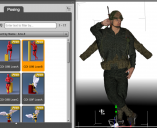
i loaded michael 9 as my actor and then want to make a uniform made for gen 8 fit him and am having lots of issues. i almost got the uniform to fit him in the default position, yet as soon as I test it with a new pose (selected from presets), the uniform flops in the jacket's arms, although pants and shoes seem okay. what can i do to force uniform to conform/ or do i have to select a michael 8 actor?
thanks,
drawn
Screenshot 2025-08-05 at 3.10.59 PM.png
1304 x 1064 - 917K

Daz 3D is part of 
Connect
DAZ Productions, Inc.
7533 S Center View Ct #4664
West Jordan, UT 84084
Licensing Agreement | Terms of Service | Privacy Policy | EULA
© 2026 Daz Productions Inc. All Rights Reserved.
Comments
Have you tried autofitting it?
If you have Michael 9 selected when you load the outfit it should bring up the autofit dialogue. Autofit is not perfect, but it will follow the character.
There is also some converters in the store.
yeah, i went through the whole autofit stuff and then did some tweaking. it looks like it fits but as soon as i apply a pose, it falls apart, plus his hair pokes through the helmet; i tried to adjust the helmet but that didn't work. then i tried to invisible the hair but cannot find the way to do that!
thanks for help; i hope for more...plus, hih do i add enough light so i can see the details? i've tried spotlight but it doesn't do the job. is that enough? can i increase the intensity?
don
The hair poking through the helmet is not related to autofit. That is a general problem.
Sickleyield has some products (hat helper) in store trying to solve that problem. If you have mesh grabber and it is polyganol hair you can use that. Geometry Sculptur (mesh grabber for Premier) should also work on SBH. Else there is D-Former. If it is SBH you can try to simulate it to fit.
For the posing, can you try to pose an image. It might be the weightmaps that needs adjusting. Or if the clothing support dForce you can simulate it.
A spotlight needs to be correctly placed and oriented. Then you have to set a sufficient Luminous Flux value (here 200000 Lumens) to be able to tweak the Intensity Parameter.
I would prefer to adjust Tone Mapping, which defaults to values suitable for a bright day outdoors, to accommodate a more normal luminance level.
You're right Richard, I only wanted to help OP about their Spotlight settings.
I would say, that having only one spotlight with nothing in the surroundings to reflect, will give an odd light.