[SOLVED] LIE Tattoos not applying properly
 shg0816_13461e8196
Posts: 352
shg0816_13461e8196
Posts: 352
I am having someone create a custom LIE tattoo for me. However, when I went to UAT it, the material file says it can't find the associated file and turns the skin turns black. I've had this person do another tattoo for me, and that one worked just fine. Loaded all the files to the same location as the last time, so not sure what the problem is. The only thing that stands out is how the tattoo is looking for the source files.
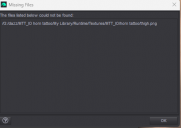
missing file.png
487 x 345 - 11K
Result.png
260 x 524 - 11K
Post edited by shg0816_13461e8196 on

Daz 3D is part of 
Connect
DAZ Productions, Inc.
7533 S Center View Ct #4664
West Jordan, UT 84084
Licensing Agreement | Terms of Service | Privacy Policy | EULA
© 2026 Daz Productions Inc. All Rights Reserved.
Comments
Have you tried looking for where the missing file is?
I assume you must have the zip, and if you open that and find where the file is, and see how that matches where it is looking.
I do have the zip file, and placed the runtime folder where it usually goes (not changing anything). The other problem is I am not even asked if I want to try and find the missing file.
I also tried renaming the file to match the "missing" file, and still get the same results
More likely the image path of the tattoo in LIE is hardcoded and directed to a non Daz Library path... and the path in the message box seems nested and it shouldn't be with a driver letter there if the image was ever loaded from a Daz Library\runtime\...
You can simply ignore the message. Open Layered Image Editor on figure's Legs surface > Base Color slot, check what path is defined there for the tattoo image. Then assign the image from the runtime folder yourself.
Besides, missing files defined in LIE never ask you to find or relocate them.
@ shg0816_13461e8196,
Adding to what @crosswind stated about the drive letter in the path to the missing file, it appears that the vendor left the path as it is for his/her computer but wrong for any other user of the file. You should be able to edit the file that calls for the tattoo image file by replacing the hard coded path to the image file with the path to the file as it exists on your computer. I use Notepad++ (free at https://notepad-plus-plus.org/) to do this and I’ve had to do it with some frequency – usually for third-party freebie files.
Exactly ~ and that's one of my favorite ways. Just edit LIE Preset DUF or Scene DUF depending on which you have.
Thanks all, I will go back to the creator and have them fix it. Since we're still working on it, I think it should be up to them to fix it.
Right ~ Agreed.