Where's my Gizmo?
 LD1
Posts: 189
LD1
Posts: 189
I am following a tutorial from the "DAZ Studio Rigging Made Easy" video tutorial that I purchased from DAZ. It has you create a simplistic man out of boxes and then apply bones to it (using the Parametric option).
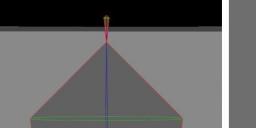
Everything went perfectly until I saw that the bones between the thighs and hip were missing. Or so I thought. The same thing happened to the teacher and he showed that the bones were really there, but VERY SMALL. Pict #1 (with three screenshots): The left screenshot shows the box man from the hip to the shins - no visible thigh bones.
The middle screenshot shows the tiny thigh bone and the right screenshot shows the tip of the tiny thigh bone. No gizmo is attached! So I can’t make it longer.
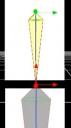
The Pict #2 shows the teacher extending the tiny bone using the Gizmo.
How do I get the gizmo to appear?

Daz 3D is part of 
Connect
DAZ Productions, Inc.
7533 S Center View Ct #4664
West Jordan, UT 84084
Licensing Agreement | Terms of Service | Privacy Policy | EULA
© 2026 Daz Productions Inc. All Rights Reserved.
Comments
How big are the polygon groups? The bone avatar size is determined by what will fit inside the matching group, if there is one.
Hi Richard
I am not sure what you are asking for. I made a 1 foot cube with 1 Division. I then kept duplicating it to make all of the box man’s body parts. If I go to the Viewport’s Wireframe setting, there are no lines dissecting each box.
I don’t know if this has any barring, but I originally make the box man in DAZ and then exported it as an OBJ. When I reimported it - it was HUGE. I had to reduce it to .05%. After saving it, it always comes back at the correct size to be used.
Do I have to start all over again and be sure the BOX man is exported at the correct size in the first place? I hope not since it takes a long time naming all of the bones etc.
Make sure you use the same preset in the export and import dialogues to avoid scaling issues.