Unable to Render No Renderer Available. How do I fix it?
 bransimms123
Posts: 7
bransimms123
Posts: 7
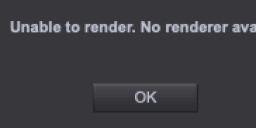
I got a messge saying "Unable to render. No render available." How can this be fixed?
Untitled.png
584 x 182 - 13K

Daz 3D is part of 
Connect
DAZ Productions, Inc.
7533 S Center View Ct #4664
West Jordan, UT 84084
Licensing Agreement | Terms of Service | Privacy Policy | EULA
© 2026 Daz Productions Inc. All Rights Reserved.
Comments
If the issue still persists, better post screenshots of : Render Settings > Hardware tab, as well as your DS log...
Any videos on how to do it?
How to do what? Window>Panes(Tabs)>Render Settings (I guess you will alreadfy have it open, though), click the hardware tab at the top of the pane, take a screenshot (e.g. using the SNip and Sketch app, click New and drag out a rectangle over the area you want to post, then click the disc icon on the right to save it). The log is available through Help>Troubleshooting>Viiew Log File, then save it and attach the saved file to a post.
I can't render using MDL. How can this be fixed?
I cannot render because of this error. How can this be fixed and has anyone ever gotten this?
Merged threads on pretty much the same topic.
You want to render with Nvidia Iray engine but you don't have any Nvidia card. Then you didn't tick CPU either, that's why you got the error message.
?