Realistic Skin Textures After Face Gen
 blakecurtis
Posts: 0
blakecurtis
Posts: 0
Hello.
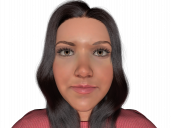
I have had some great success using facegen, the models come out generally fantastic, especially from a distance. However, many times after generating the model the skin looks bland, smooth, like plastic. No pores or skin wrinkles etc. I want a way to easily add these more realistic detials, onto my own Facegen models. I know facegen will make the textures, and if you have a super high resoloution pictures, those details will show, but I cannot always get the perfect pictures.
I have read to turn up the maps for more detial, in the instance attached, there are no "normal maps" or "bump maps" for me to turn up.
To sum it up, what is a good way of making her face skin look photorealistic? I have attached 2 renders. One with HDRI lighting, the other with a front facing spotlight, so you can see the lack of detial.
Thanks all.


Daz 3D is part of 
Connect
DAZ Productions, Inc.
7533 S Center View Ct #4664
West Jordan, UT 84084
Licensing Agreement | Terms of Service | Privacy Policy | EULA
© 2026 Daz Productions Inc. All Rights Reserved.
Comments
You could try loading an existing character that you like which already has normal maps, and then replacing the diffuse map with the Facegen map. This way you will have a normal map which will not be an exact match for the Facegen testure but it will provide some detail. When I use Facegen I only use it for middle distance characters, I generally find that while it can create recognizable faces they don't stand up to close-up views.
There are progams which can create a normal map and/or a bump map from a diffuse image ( such as PixPlant ), but if your source image doesn't have the detail then a nomal map/bump map derived from it won't have detail either.