Does the Alpha Iray Canvas have any use?
 Jumbotron
Posts: 279
Jumbotron
Posts: 279
Hello,
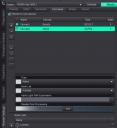
When I render this canvas, all I get is a small .EXR image that apparently contains no useful information. I mean, if I open that .EXR file in Photoshop and adjust exposure it only can go all the way from white to black, but no details of the actual scene are visible. It does not matter if I render the alpha of the whole scene or if I select nodes from the scene instead. The result is the same.
Sin título.jpg
1046 x 1147 - 166K

Daz 3D is part of 
Connect
DAZ Productions, Inc.
7533 S Center View Ct #4664
West Jordan, UT 84084
Licensing Agreement | Terms of Service | Privacy Policy | EULA
© 2026 Daz Productions Inc. All Rights Reserved.
Comments
Are there any open spaces in the scene or is it all covered by models?
Thank you, Richard. If the open spaces part is to be understood literally, then I guess the answer is No, there are no open spaces in the shot, meaning that everything appearing within the frame can be selected in the Scene tab. I'm attaching the texture shaded view of the test scene as well. There should be open spaces for the Alpha canvas to do something useful then?
EDIT: My whole purpose behind this is making masks of selected nodes within one single scene. In one videotutorial I've seen they use a beauty canvas with the Alpha option ticked for that. But in past tests I did I couldn't quite get the expected result that way either. And I've also seen videos where (if my memory serves me well) they simply use a white backdrop and no lights to produce the masks by rendering the scene that way. I should keep trying, I guess.
edit because my question was answered in the OP.
I just started experimenting with it, and I'm having a hard time controlling the alpha canvas at all.
I haven't ever used the Alpha channel much to be sur, what you are doing with the nodelist looks as if it should work but I just wanted to check the other details of the scene.
I've now been messing with this for quite some time, and I haven't figured out how to make the alpha canvas contain actual information. It's just white, every time.
Hi again,
I think that Richard's reply to my OP may point in the right direction. My tests suggest that transparency is key to obtain something useful out of the Alpha canvas.
I'm attaching two images. In both, only the character (and her child nodes), the lights, the Tonemapper Options and the Environment Options are set as visible in the Scene pane. The rest is all invisible. The only difference between both Alphas is that in the first the Environment mode was set to Dome and Scene, whereas in the second it is set to Scene only. Rendering the latter took quite a while, by the way.
I did not adjust the exposure of the Alphas in Photoshop. It does not seem necessary. I just exported them to the attached PNG images.
Nonetheless, selecting specific nodes from the scene when configuring the Alpha canvas seems to not have any effect whatsoever. The only way I've found to select what to include in the Alpha is adjusting the visibility in the Scene pane.
P. S. One important note: you must always render a beauty canvas first and foremost. In my tests, when I tried to render only the Alpha canvas, I just got a useless "empty" .EXR file. In other words, always have a beauty canvas rendered first, as shown in my canvas setup in the first post.
Seems to me that it kind of defeats the purpose of an alpha matte if you have to hide everything else in order to render it. It would be easier to make your own alpha matte from a beauty canvas by checking "alpha" and dropping a black background behind it in your image editing software of choice.
Thanks for the suggestion. :) I'll try that method.