Heel height during "Daz to Unreal" Bridge
 SpellaD
Posts: 0
SpellaD
Posts: 0
The bridge works well with the exception that it doesn't properly adjust the heel height.
While the conversion is happening, I notice that the figure gets "reset" back to a lower height. Once the transfer to UE5 is done, it sets it back up.
Sadly this results in the heels in UE5 sinking into the ground. Is there a way to "freeze" this before export?
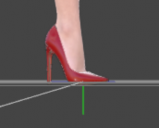
Screenshot 2025-06-29 025854.png
387 x 311 - 30K

Screenshot 2025-06-29 025837.png
348 x 288 - 34K
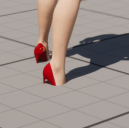
Screenshot 2025-06-29 025154.png
261 x 259 - 83K

Daz 3D is part of 
Connect
DAZ Productions, Inc.
7533 S Center View Ct #4664
West Jordan, UT 84084
Licensing Agreement | Terms of Service | Privacy Policy | EULA
© 2026 Daz Productions Inc. All Rights Reserved.
Comments
It's just a guess and maybe a wrong one (I don't use Unreal Engine), but when you got the feet of the figure above ground, where did you change the Y Translation value ?
If it's done directly on the figure (the CTRL/CMD + D command to get a figure above ground will do that), maybe transfering it to the hip bone could solve the problem ?
I don't know if there is a better way to transfert it, but here's how I'm doing it:
After the first step, the figure should now have part of her feet under ground, and after the second, they should be back above it. If the hip bone has some rotations applied, it could require a bit more tuning.
Hopefully, it'll fix your problem but if it doesn't, there is a dedicated forum for Unreal:
https://www.daz3d.com/forums/categories/unreal-discussion
Thank you so much for trying to help. I figured it out ultimately by "locking" the Y translation before exporting with Daz To Unreal bridge.
I'll check out the forum as well!