(Solved) How to delete unwanted created scenes

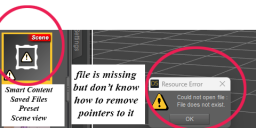
I have created scenes that I now want to remove. How do i do that? The attached image shows a scene that apparently is missing pointers or parts have become corrupted or deleted. The attached shows my smart content/saved files/preset/scenes view. I really want to get it and other unwanted content out of my content display.
Screenshot 2025-06-26 125020.png
576 x 240 - 35K
Post edited by robross on

Daz 3D is part of 
Connect
DAZ Productions, Inc.
7533 S Center View Ct #4664
West Jordan, UT 84084
Licensing Agreement | Terms of Service | Privacy Policy | EULA
© 2026 Daz Productions Inc. All Rights Reserved.
Comments
Right-click>Remove reference (from memory) - it's a databvase entry rather than a file in itself.
Thank you, Richard. Sorry, I'm totally lost. Can't find "Remove reference" in the dropdowns. Could you walk me through the "for dummies" version. What screen am I looking at when I right click?
Find the file in the Content Library in Categories>Saved Files... (the same as it appears under in Smart Content) and you will get the remove reference option. Sorry for misleading you, I thought this one had been added to Smart Content too but in general the Content Library is the one to use for managment
Thank you!