Fitting skirt to G9
 nama_polly
Posts: 1
nama_polly
Posts: 1
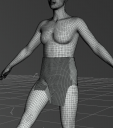
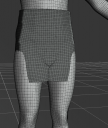
I'm trying to fit this item "dForce Office Lady Suit for Genesis 8 and 8.1 Females" to G9. The other wearables in the set conform better (not perfectly), but the skirt does not fit at all. Without smoothing the geometry in between the upper legs is oddly distorted and does not bend correctly as the legs move.
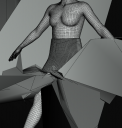
Adding a smoothing modifier creates another problem of exploding geometry, where verticies jut outwards in random spikes. The problem gets worse the more smoothing is applied and at smoothing 10+ the entire screen is covered by the skirt deforming. The effects are mostly visible around the front and back area around the hips / in between the thighs.
I can of course export to zbrush and smooth the skirt out there easily as long as I don't turn the smoothing modifer on, but that is a temporary fix for a single pose. I would like a more permanent solution. Can someone who is more knowledgable about this diagnose the issue and help come up with a fix? What is going wrong with auto-fit?

Daz 3D is part of 
Connect
DAZ Productions, Inc.
7533 S Center View Ct #4664
West Jordan, UT 84084
Licensing Agreement | Terms of Service | Privacy Policy | EULA
© 2026 Daz Productions Inc. All Rights Reserved.
Comments
In AutoFit try selecting a skirt or dress template - skirts can't really be rigged to actually follow the legs directly. Another option would be to apply a dForce modifier and simulate the skirt.
Thanks for the suggestion. I did forget to select the dress template (do not see any skirt) and this does "bend" a lot better.
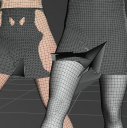
But the smoothing issue is still a big problem (see the attached images). There is still a little bit of wierd geometry, and then adding a smoothing modifer creates problems especially when the legs move.
I would like to avoid dForce if it all possible.
You could try to use Zbrush to fix the problem in the base pose then use that fix to update the geometry of the skirt: maybe if it's starting from a cleaner position, it'll not have vertices going crazy.
Something like this might help: https://www.daz3d.com/sy-detriangulator-tunic-genesis-9