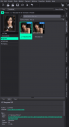
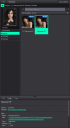
Whats the difference between these two items ??


Daz 3D is part of 
Connect
DAZ Productions, Inc.
7533 S Center View Ct #4664
West Jordan, UT 84084
Licensing Agreement | Terms of Service | Privacy Policy | EULA
© 2026 Daz Productions Inc. All Rights Reserved.
Comments
They are the same, but in general the Characters folder itself wll contain a preset for loading/applying the full character (so you have quick access to the basic characters) while the sub-folder under the PA/product names folders will have a second copy of the overall preset plus options (diffrent makrups and so on) and presets for just the shape or just the materials (to allow mixing-and-matching, or if - like me - you geernerally find it much faster to use the shape and amterials on a base figure rather than load the full character in one go)
Thanks for the explanation !