I've accidentally broken my DAZ Studio environment
 Stan Nice
Posts: 40
Stan Nice
Posts: 40
Hello everyone,
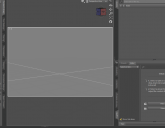
It's been two hours I'm looking for a solution with this problem : I've lost the floor grid, and the background color is the same as the floor so I can't figure out whre the horizon is. The only thing I have is a small white crosse in the center of my viewport.
This already happened to me last year, and I can't retrieve the post I made about it. This time, I cannont find any solution either.
Found this https://www.daz3d.com/forums/discussion/379146/grid-is-gone but it seems this was another problem.
Found this : https://www.daz3d.com/blog/learn-with-daz-3d-customizing-your-interface-in-daz-studio but I can't find the "Select a lyout" panel.
The gray color is slightly lighter than the usual one, it might be caused by loading some kind of environment presets.
Can you help me restor my viewport this its default ?

Daz 3D is part of 
Connect
DAZ Productions, Inc.
7533 S Center View Ct #4664
West Jordan, UT 84084
Licensing Agreement | Terms of Service | Privacy Policy | EULA
© 2026 Daz Productions Inc. All Rights Reserved.
Comments
Try to click the 4 bars in the corner of the viewport, and find 'Show Floor'. It must be ticked.
For selecting a layout go Windows > Workspace > Select Layout
Fastest way would be to change the layout or Style. Window>Style>Select styls, or Window>Workspace>Select Layout.
You can change the background color by going to Window>Style>Customize Style>6.Viewport(Default is 55,55,60).
Not sure on the floor.
Thank you guys, reloaded the city limits default and got the grid again. The problem wasnt the floor did not showed up (viewport options) but it appeared as a simple cross. For the next time, I will save my default layout, and note where to find the customization.
Once again, than you so much !