Problem in the Parameters tab - menu options not showing. - Solved
 stripe6499_9253833ae8
Posts: 195
stripe6499_9253833ae8
Posts: 195
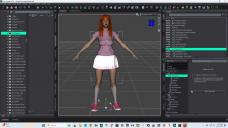
Just opened Daz studion 4.24 to work on a project and opened a saved scene. but there's a problem. I select an item in the scene and go to the parameters tab, select something like General and I usually get all the translation/rotation/scale options showing. At the moment they don't show up, I have to expand the General menu and drill down to the Translate menu before the translations show up. Same with the Actor menu where shaping morphs can appear. Any idea why these items aren't showing up and I have to drill down to the end menu to get them to appear?

Daz 3D is part of 
Connect
DAZ Productions, Inc.
7533 S Center View Ct #4664
West Jordan, UT 84084
Licensing Agreement | Terms of Service | Privacy Policy | EULA
© 2026 Daz Productions Inc. All Rights Reserved.
Comments
You need to tick 'Show sub-items' at the bottom.
Sigh... thank you. I knew I'd hit something stupid...