White areas light reflection on hair
 wisegothgames
Posts: 15
wisegothgames
Posts: 15
Hello,
I would like to ask for your help about an issue I couldn't solve. I tried to do some renders using this hair on my character:
https://www.daz3d.com/dforce-strand-based-short-messy-ponytail-hair-for-genesis-9-and-8-female?srsltid=AfmBOoowO4ZrBwO9nKzzBIIuusjAiJuMcVM1zN1I9_l1bjMDjISEwZqP
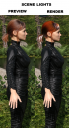
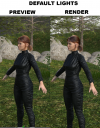
It looks all good on the Iray preview, but when actually render the picture, the hair has some very odd white spots due to light reflection (?). I tried to do a render without adding any additional lights, the results look better but still the hair is a bit white on the top and overall scene looks much worse of course without lights.
Another problem is that the supposedly copper red hair changes to black on some areas, which is very unnatural as well. I tried more environment sets that came with light options, same results unfortunately.
How can I make these white (and black...) areas go away on my renders? I already tried changing glossy settings, and put render time to endless, but doesn't matter if I render the picture for 5 or 20 minutes, the white is still there. I tried to add TopCoat and even bought separate shaders and applied them as I read in an old thread that maybe it can be a solution, but results are still the same.
https://www.daz3d.com/omnihair-naturals
https://www.daz3d.com/sfd-omni-shaders-for-strand-based-hair
So after spending half of my day trying to figure this out, I gave up to solve this on my own. I attach example pictures to illustrate my issue.

Daz 3D is part of 
Connect
DAZ Productions, Inc.
7533 S Center View Ct #4664
West Jordan, UT 84084
Licensing Agreement | Terms of Service | Privacy Policy | EULA
© 2026 Daz Productions Inc. All Rights Reserved.
Comments
Can anyone help me here please? Actually this is the only hair not working, others from the same artist work fine....
It looks like it is your sky reflecting.
How is your setup?
Are you using an HDRI or a backdrop?
Alternatively, you can turn gloss down on the hair, but it will overall make it more dull.
I tried with different setups, on is with a dome and light source (sun) inside it, and I tried HDRI as well, and the default settings too. I already turned down gloss, didn't help. And what is strange that other hairs from same author work fine.
Hello there,
please check the following:
- Select the hairstyle in the Scene Tab and go to Parameters->General->Line Tessalation.
What do the 'Viewport/Render Line Tessalation Sides' say?
Are the values at 0 and 1? Or 0 and 0?
Hello Toyen,
Viewport Line Tessalation Sides: 0
Render Line Tessalation Sides: 1
And these are the default settings, I didn't change anything here.
Worked like a charm. Thank you both!
I thought that would be the issue.
Looks like the artist forgot to set the Render Tessalation Sides to 0. Glad you found a solution!
Toyen