About remove Design engravings on a shirt (have image)
 foxyfoxfurries
Posts: 394
foxyfoxfurries
Posts: 394
Hello , I have some shirt and it looks amazing but if I want to change the Hooters to other image the hooters still seen on the shirt with engravings. I took some photos to show you what I mean.
Have any way to remove the engravings or it's design with the shirt and can't be removed?
Thanks! ^^
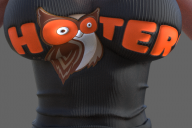
HEE.PNG
733 x 488 - 652K
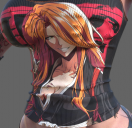
EX.PNG
687 x 664 - 1M

Daz 3D is part of 
Connect
DAZ Productions, Inc.
7533 S Center View Ct #4664
West Jordan, UT 84084
Licensing Agreement | Terms of Service | Privacy Policy | EULA
© 2026 Daz Productions Inc. All Rights Reserved.
Comments
It's in some combination of the bump, normal, or diisplacement maps probably.
I speak on the hooters logo , if you notice when I change the texture it still write hooters in like engravings , So I can't remove it if I understand right? thank you by the way
The encarving is most likely in the normal map or bunp map. So I would sugget to look at those, and potentially change.
Sorry if its dumb question hehehe , But you mean like if the editor of this shirt made some normal shirt without the bumps? If Yes I tried to search one without it but he didn't do it.
If you mean something else can you guid me please
Bump and Normal maps tell the surface of an object if it has any deformations or "engraving"
To find it on your shirt
Select the Shirt in the "Scene" Pane
Now go to the "Surfaces" pane
Scroll down until you find "Base Bump" and put your mouse cursor over the image.
In a few momenmts it should show you a preview of the image and also let you know where the image is at. Please try to remember the location of the image you may need it later.
If you see words or anything else on this image they will be made as engravings in your object.
Normal maps do the same thing only in a different way.
Some products use both, some use one or the other.
edit: I should also say that Displacement maps also do this but in a different way from Normal and bump maps.
Normal and bump maps makle "fake" engraving. If you rotate the object the illusion of surface roughness or engraving fades and turns smooth again. Displacement maps actaully lift the geometry to make the shape of the map.
Any of these 3 maps can give the efftect you are seeing on your shirt.
So if all of those maps have the words on them our choices are limited to make new maps that don't havew the words or just remove the maps from the image sxlot for each one in Surfaces.
I must say you teach me new trick of making good stuff! thank you! hehehe , But about the Hooters it still on the shirt even that I change to something else , It just add the new thing I do on the hooters bumps logo. It's not really "deleting" it , maybe I missed something? thanks!
That bluish color means there are different maps on the surfaces. First expand the surfaces, by clicking on the small triangle, outside the yellow area, not visible on your image.
When expanded, click through the surfaces, to find the right one to modify.
You appear to have all the surfaces of the model seelcted, by clicking on the model name, and there are different maps on some of them so your screenshot doesn't actually show what is happening.
I pretty much missed something you meant like that? because it still have the hooters bumps.
If that is the original bump texture, you need to change it.
If there is something in the normal map, you can probably just remove it, else you would need to find a more generic one, that doesn't have the hooters engraved.
And a value of 50 is a very high value. For normal use I would set it to 1-3.
This outfit don't have normal map but I will try your second option , Thank you very much! ^^
Edit it works! I'm sorry I missed the normal map below! my mistake! your awesomes! THANK YOU VERY MUCH!