dForce Archmage
 matew
Posts: 119
matew
Posts: 119

Short Promo Video:

Video Tutorial:

Have you ever wished your dForce simulations could run significantly faster? Save them as morphs or even as animations—so you can layer one simulation over another or quickly compare different settings?
Would you like to eliminate endless spring rebuilding with a single click?
Ever tried to include a simulation in your animation loop, only to give up because it's nearly impossible to make the dForce result match at the first and last frames?
What if you could adjust everything you need for a simulation from a single screen—but still have the option to just click "Launch" and reuse your previous setup?
And have you ever thought it would be amazing to automatically raise your character over a chair, scale their clothes slightly just for the simulation… and then clear that motion afterward?
Introducing Matew's dForce Archmage – the ultimate toolkit designed for blazing-fast, intuitive, and deeply powerful dForce simulations. This groundbreaking suite dramatically speeds up your workflow—up to 2× faster or more—while empowering you with unprecedented creative control. From instantly converting simulations into reusable morphs and flawless animations, to managing materials and wind effects from a single unified interface, dForce Archmage gives you complete mastery of your dForce creations.
Why Choose dForce Archmage?
-
Lightning-Fast Simulations: Achieve simulation speeds up to twice as fast or even more, depending on your scene complexity—no more endless waiting.
-
One-Click Simplicity: Convert dForce simulations into reusable morphs or visually indistinguishable animations in a single click, effortlessly preserving your creative vision.
-
User-Friendly Interface: Enjoy a streamlined UI, designed for both beginners and advanced users, with detailed descriptions and helpful tooltips for every dForce parameter and material setting.
-
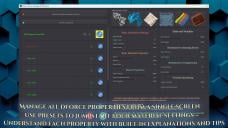
Centralized dForce Control: Adjust all dForce parameters from a single, convenient screen—apply material presets, tweak properties, add or remove dForce modifiers and weight nodes, freeze/unfreeze nodes, show or hide objects, and instantly receive diagnostic reports for quick troubleshooting.
-
Non-Destructive Editing: Effortlessly refine your simulations—adjust or fine-tune an object’s shape at specific frames without affecting your existing simulation results.
-
Perfect Animation Loops: Create seamless looping animations with just one click—ideal for smooth, continuous cloth and hair animations.
-
Multi-Layered Simulations: Apply new dForce simulation layers over existing ones to produce complex, multi-stage cloth effects and intricate animations.
-
Instantly Fix Slow Springs: Eliminate long delays caused by collision offset recalculations in problematic props or garments with just one click.
-
Powerful Wind Management: Create and manage dForce Wind Nodes effortlessly, with wind parented to invisible cameras for precise, intuitive control. Choose from a variety of built-in animated wind presets perfect for every scene, from gentle breezes to fierce hurricanes.
-
Simulation Settings Made Easy: Quickly reset simulation parameters to defaults, or select from the list of your own saved presets, all directly within the simulation launch screen.
-
Effortless Object Management: Preview, edit, and organize all simulation participants before launch—instantly assess dForce status, toggle visibility, freeze state, and troubleshoot issues from one unified interface.
-
Customized Exclusions: Define a default exclusion list for objects always skipped during simulation, such as mouths or eyelashes.
-
Visual Bone Selection: Intuitively exclude bones or entire bone groups (like left hand or right leg) from simulations using a convenient visual selection map for Genesis 3 to Genesis 9 figures and nearly all wearables.
-
Enhanced Friction Control: Adjust friction on non-dForce objects, overriding DAZ Studio’s fixed 40%, to achieve more realistic and controlled interactions.
-
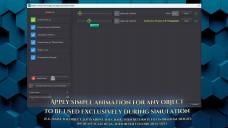
Temporary Animation Presets: Easily apply one-time animations for setup (e.g., temporarily lifting a character over a chair) and automatically revert back after simulation, saving you valuable time and effort.
-
Optimized Smoothing Modifier Handling: Temporarily disable smoothing modifiers during simulation to greatly reduce simulation time, automatically re-enabling them afterward without impacting visual quality.
Don't let technical limitations and long waits hold back your creativity. With Matew's dForce Archmage, achieve unparalleled control, unmatched speed, and limitless artistic possibilities.
Elevate your dForce experience—become the Archmage of dForce Simulations!







Daz 3D is part of 
Connect
DAZ Productions, Inc.
7533 S Center View Ct #4664
West Jordan, UT 84084
Licensing Agreement | Terms of Service | Privacy Policy | EULA
© 2026 Daz Productions Inc. All Rights Reserved.
Comments
For the forum please use a non-textured figure in the image showing a nude - we don't have the content filtering that the store has.
Oh, you meant the one where I show how to pick up the bones? But it is non-textured figure, without any gender signs. I am really confused.
It still had a skin texture rather than being a clay render, or seemed to.
It was a Genesis 8 Male figure rendered in A pose and then colored in green (all bones selected), yellow (part of bones deselected), or grey (no bones selected). No textures - just solid colors.
This looks very interesting
Ah, OK - I have bad colour vision (and my brain sometimes interferes beyond that).
This looks really interesting, is it compatible with the 2025 version?
It looks like the core functionality works to some extent, but DAZ 2025 makes the dialogs completely unusable, and there’s no fix for it at the moment. The only workaround is to strip out all the icons and turn my carefully designed, polished dialogs into plain, boring DAZ-style ones. I’d really like to avoid that and am hoping the DAZ team will address it in one of the upcoming beta versions.
Looks outstanding!
Is this a released product or a future product or ???
It's a future product. It has already passed QA and is ready for testing.
Looks interesting.
Added video tutorial
Sounds like you've incorporated an AI voice. It's doing a good job.
Yes, I used to use my slightly processed real voice, but no matter how hard I tried, my accent was still strong. With AI voiceover, no one will have any trouble understanding.
And it is released:
https://www.daz3d.com/dforce-archmage
Thanks! Finally some new, good tool for animations!
One way ticket to my Wishlist, waiting for next purchase turn!
Hey, mate!
I just picked up your product from the store. I can't get the looping to work with one of my hairstyles.
https://www.daz3d.com/dforce-strand-based-beach-style-long-hair-for-genesis-9
Do you have any tips on what I could be doing wrong? I tried a couple of other hair products, and they worked fine. This one just won't create a morph.
Hey, jksafe!
I just tested this hair myself, and I couldn't get it to work either. I don't know what's wrong with it. When trying to copy and paste the geometry back, I get a "geometry mismatch" error that makes no sense.
And the problem isn’t limited to dForce Archmage. I tried creating a morph using DAZ Studio’s standard tools, with Morph Loader Pro, and encountered the same error. Moreover, ManFriday's Mesh Grabber also refuses to work with this asset.
So this isn’t a bug in dForce Archmage, but rather some kind of incompatibility at the DAZ Studio level itself.
Sorry, but I really don’t know what I can do here. Still, thanks for uncovering the issue.
I don't own that hair, but does it perhaps have unused vertices? Is the export set to remove unused vertices, making the import geometry not match?
Thanks for the answer. My luck to find the one asset that doesn't work... ^^
Thank you. That seems to be where the problem lies: when you select this hair with the Geometry Editor Tool, DAZ shows in the Tool Settings Pane that it contains two Face Groups (default and head), and each of them contains 0 vertices. As a result, “Select All Vertices” doesn’t select anything — as if the hair isn’t a mesh object at all.
At the same time, the Info tab shows that it contains 404,736 vertices:
Name :
BeachStyleLongHair_404736
Label :
Beach Style Long Hair Strands
Class :
DzFigure
Vertices :
404,736 / 404,736
Triangles :
0 / 0
Quads :
0 / 0
Total Faces :
0 / 0
Total Lines :
16,864 / 16,864
Apparently, the reason is that the hair consists not of quads or triangles, but of lines.
Honestly, I don’t really understand what kind of structure this is.
Also, trying to “Edit Strand-Based Hair” doesn’t work either — this isn’t a Strand-Based Hair Node.
The lines in the hair are Iray Curves. That is how most dForce hair in the store is structured. Once a PA converts a Strand-Based hair to dForce, it is no longer editable by users with the Strand-Based hair editor in Daz Studio. I don't see anything unusual in the structure of this hair, as shown in your capture of the Scene Info data. For example, I have attached the Scene Info for Juneau Hair dForce Strands.It is certainly possible for users to create morphs based on dForce simulation of Daz hair products based on Iray Curves. I have done it many times. I believe I even commented on that in the Morph Master forum thread. I have not tried it with Archmage.
Note that Linday dForce Hairs usually use the "cloth based" dForce system That does not use Iray curves, but uses normal polygonal geometry and the normal cloth based dForce simulation.
Archmage has the same problem that Morph Master had with the toggle for setting favorites not working. I uncheck Add to Favorites and Save Settings. The dforce Archmage 02 Morph Extractor still marks every created morph with the heart favorite icon.
I'm having problems with this product so far.
Edit: I resolved at least part of this. After Healing Simulation Springs, G9 was no longer selected. Only the clothes were selected. That is why the simulate from memorized pose did not work and why the simulation results were terrible.
I still don't know why not all of the clothing had the collision offset changed when I ran Heal Simulation Springs, though.
Just to chime in one last time. Do the latest comments mean that hair from the same creator who I got the first hair item from that I posted most likely won't work either?
New example: https://www.daz3d.com/dforce-strand-based-soft-curls-casual-long-hair-for-genesis-9-and-genesis-8-female
That's another hair that I don't own, but I can't get Archmage to even simulate any strand-based dForce hair. When you click on the dForce Archmage 08 Invoke dForce script, does it actually simulate the hair strands for you? The log file says:
2025-06-25 13:43:00.248 [WARNING] :: \src\dzdynamicsengine.cpp(2498): ERROR: clCreateBuffer (-61)
2025-06-25 13:43:00.266 [INFO] :: Script executed successfully: N:/DAZ 3D/Studio/My DIM Library/scripts/matew/dforce archmage/dforce archmage 08 invoke dforce.dse
Normal simulation commands work fine and Man Friday's dForce Companion work fine.
Next problem: Since I can't get any dForce strand-based hair to simulate with Archmage, I'm trying a Linday cloth-based simulation hair. I am using Classic Blowout Hair. I applied Linday's Simulations Settings preset for the hair. It set the gravity to 6 and the air resistance to 2. Unfortunately, Archmage will not let gravity be set above 1 or air resistance be set above 1, so it appears that it does not allow simulation to use the values appropriate for that hair. I don't know what values are really being used. I am reporting what I see in the Archmage interface, which differs from what is shown in the Simulation Settings pane.
It worked for me with this one:
https://www.daz3d.com/dforce-strand-based-top-wave-long-bob-hair-for-genesis-9
The loop worked on that one as well, but only if you select the figure, the hair parent element, and the nested strands element. If you only select the figure and the strands or only the figure and the parent element, it won't loop. I had to experiment a lot because such details aren't included in the Archmage documentation.