content on external mac drive not showing up
 Chakradude
Posts: 301
Chakradude
Posts: 301
I have come back to trying to use Daz studio on my mac since Filiment Render style is finally available. Trying again to get content on my external drive to show up. It looked like it might but no show of actual files. I have not downloaded much; waiting to see it work first. I can see the files residing on my external drive (called "DAZ CONTENTS". Daz studio lives on my main drive. I am using the DIM for all instalations.
any and all help appreciated!
Chakra

Daz 3D is part of 
Connect
DAZ Productions, Inc.
7533 S Center View Ct #4664
West Jordan, UT 84084
Licensing Agreement | Terms of Service | Privacy Policy | EULA
© 2026 Daz Productions Inc. All Rights Reserved.
Comments
As some might surmise I am going to be using daz Studio 2025 alpha but I get the same result on daz studio 4.24
macmini 2020 m1 chip running Sequoia 15.5
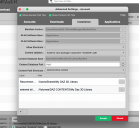
The first thing to answer your question is to show us the mapping of your Daz Studio. Open Daz Studio, open Preferences, open Content Manager, expand the trees, and take a screenshot. Just in case, you did install CMS and it is running?
Thanks so much for your response. I did install CMS and it is running. Tomorrow morning I'll go back to my store where the Mac is and I'll take a screenshot. Thanks again.
Daz Studio doesn't care about the drive's name visible in the Finder but about the name of the mount point. so I would check in Disk Utility that the mount point of 'DAZ CONTENTS' is really '/Volumes/DAZ CONTENTS/' and not something like '/Volumes/DAZ CONTENTS1/'.
Source of the picture: https://support.apple.com/guide/disk-utility/welcome/mac
It can happen if MacOS though at one point since you started your computer than 'DAZ CONTENTS' was unplugged for a very short time without being disconnect properly: in this case, the mount point will likely be changed to '/Volumes/DAZ CONTENTS1/' (or something like that) while Finder will still show 'DAZ CONTENTS' as the name of the drive.
If it isn't that, I don't know what it can be, but each time Daz Studio wasn't able to find something on my external SSD, it was due to that problem (there is probably an easier way to solve the problem, but when it happened, I simply restarted my computer after saving all the various documents or scenes I was working on of course).
That is an interesting consept because I am sure at one point my external drive got the cable disconnected (dispite me strapping it to the computer with rubber bands lol) I'll see what I can figure out.
Well I don't see a problem with the drive name but I included a picture of it in disc utility.
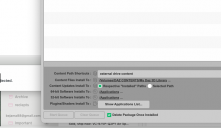
I have also posted my content manager trees expanded
I think perhaps I have made duplicate links but not sure.
The mount point is correct, so it's not that.
Looking at the way you added content, in the Content Directory Manager, I think I spotted the possible error: Daz Studio is currently set to search content in '/Volumes/DAZ CONTENTS/' and not in '/Volumes/DAZ CONTENTS/My Daz 3D Library' where DIM was told to install the content.
Does changing '/Volumes/DAZ CONTENTS/' by '/Volumes/DAZ CONTENTS/My Daz 3D Library' in the Content Directory Manager fix the problem ?