Order of clothes?
 Stellar
Posts: 49
Stellar
Posts: 49
Hello,
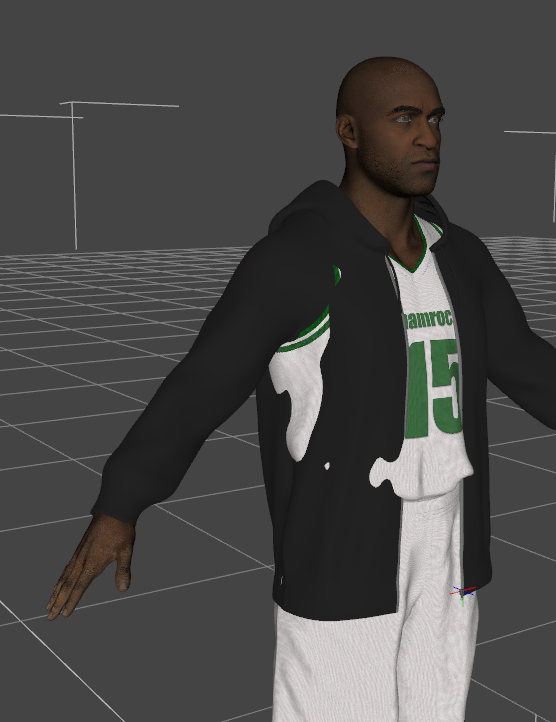
I dressed my character, but I encountered a problem. The jacket I put on the jersey wasn't counted by the software as being ON the jersey. The two items of clothing merge. How can I separate them? I tried "Mesh Smoothing," but it doesn't work.

Daz 3D is part of 
Connect
DAZ Productions, Inc.
7533 S Center View Ct #4664
West Jordan, UT 84084
Licensing Agreement | Terms of Service | Privacy Policy | EULA
© 2026 Daz Productions Inc. All Rights Reserved.
Comments
As default clothing is not designed with other clothing in mind, unless it is part of the same set.
And they will therefore often clip like you see.
Different methods for reduce it.
The clothing might have adjustments morph, that might help.
If they support dForce, you could try first to simulate the shirt, with the jacket hidden, and then freeze the simulation of that.
Then show and simulate the jacket, but before start of simulation, make sure they don't clip.
To avoid clipping there is different methods. You can use mesh grabber, to move cloth in or out as convinient.
You can add a smooth modifier. Most clothing has it, but you can change the collision object. For the jacket set the shirt as collision object.
You can add a push modifier (it can both be positive and negative (shrinking).
Finally you can take it into a modeller and make a custom correction morph.
I can see that the jacket support dForce (there is a rigid follower node). You could try adding a push modifier, and adjust it so it don't clip, and then simulate the jacket.
You can also, subject to the same need to avoid clipping at the outset, simulate both at once with different Collision Layer values (in the Surfaces pane).
Sometimes I find changing the 'Fit to' figure works. If you fit the jacket to the 'jersey' instead of the 'character', the jacket will try to meld iself over a bigger figure and there may be less chance of poke-through.
My logic for trying this is that the jacket doesn't touch the character, it actually touches the next garment in towards the character, so fitting it to the character may be a problem if not enough room has been left for the next garment in on the layers.
Anyway, you shouldn't lose much more than a minute trying it, so I suggest you give the idea a go.
Regards,
Richard
...and sometimes you just have to do the zbrush thingy.
yeah if you combine these two things you can probably fix this with very little effort. this combo fixes almost every casual fitting problem.