DAZ Horse 2 never seen issue
 FantastArt
Posts: 427
FantastArt
Posts: 427
Hi
I just loaded the Daz Horse 2 and saw an issue I never recognized before.
The left leg is looking weird. It's much thinner than the right one. Is there a way to fix this? I just reinstalled it, but that doesn't solve the problem.
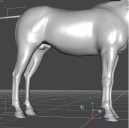
Screenshot 2025-05-31 160352.png
711 x 705 - 173K
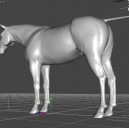
Screenshot 2025-05-31 160339.png
697 x 692 - 160K
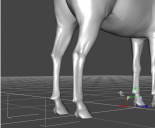
Screenshot 2025-05-31 160417.png
652 x 540 - 120K
Post edited by FantastArt on

Daz 3D is part of 
Connect
DAZ Productions, Inc.
7533 S Center View Ct #4664
West Jordan, UT 84084
Licensing Agreement | Terms of Service | Privacy Policy | EULA
© 2026 Daz Productions Inc. All Rights Reserved.
Comments
Wow that is seriously bizarre! I've never had that happen so not sure what to tell you...
If you in Parameters enable 'show hidden' and then select 'Currently used', what does that give?
If you have Matari3d's Zombie Horse installed, it is from a morph called "Parameters->M3DZH->M3DZH Leg Bag Left Bone 02" (I assume Bag should be Back). It defaults to 100%, whereas the right side is at 0%. There also appears to be one morph missing for the back right leg, there are two on the left, and only one on the right.
[ETA] Actually, it's a little more complicated. There are two "M3DZH Leg Back Left Bone 01" morphs, one is called "Back", the other "Bag". The ID's are the same for both, but since the "Bag" version loads after the "Back", it overwrites the first definition. The second right back leg morph is still missing...
However, the "Full Zombie Horse Base" morph sets one big monolithic morph for the whole horse (back legs included), not each individual morph.
Thank you so much! That solved it! Maybe this product should be updated?!
It "should", and will require a ticket, but who knows how long that will take? Meanwhile just delete the offending duplicate morph file (\data\DAZ 3D\DAZ Horse 2\Base\Morphs\Matari3D\M3DZombieHorse\M3DZH Leg Back Left Bone 01) and the problem will not happen again. (That's the one that sets the value to 100%, and is the only difference between the two files).
Hi everyone,
A few days ago I came across the message here about the bug in my product caused by a duplicate morph file. Until then, I wasn’t aware of the issue, and I’m really sorry it was there for so long.
As soon as I saw the post, I immediately fixed the bug and uploaded the corrected version. Thanks to the DAZ team, the update was published quickly and should now be available as an automatic update.
If you spot any other bugs or issues, please don’t hesitate to let me know — I’ll do my best to fix them right away.
What matters most to me is that anyone who buys my products feels happy and satisfied with them. I always try to give my best and improve with every release.
Again, I truly apologize for the time this bug remained active, and thank you all for your help and patience! Thanks!!!!
Best regards,
Unfortunately, for me the issue still remains. I completely forgot about this problem until just this evening when I was using the Horse 2. I remembered there being an issue with some addon but couldn't remember which one. In the Install Manager it has a "Remote Date" of 6/15/2025 but there's no mention in the read me of an updated fix. It's bad enough Horse 3 still has ignored problems but after all this time, Horse 2 still has this issue?