Working with assets from outside Daz3D

Hey Guys,
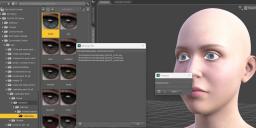
I'm in need of an expert opinion on this issue I'm experiencing as shown in the screenshots.
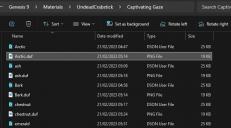
I've downloaded some assests from outside Daz store (Renderhub) and weirdly enough, none of them is working properly. When trying to apply either the eyes, clothes, poses or whatever to my Actor, the system is returning "missing files" errors. I'm not sure where to look for these files Daz is asking for.
Do you guys know if this is a common issue with files from outside Daz store or is it just me not doing something right?
I really appreciate any help you guys can give.
Cheers!

Daz 3D is part of 
Connect
DAZ Productions, Inc.
7533 S Center View Ct #4664
West Jordan, UT 84084
Licensing Agreement | Terms of Service | Privacy Policy | EULA
© 2026 Daz Productions Inc. All Rights Reserved.
Comments
It looks as if you have the whole product in a sub-folder, the Data and Runtim folders at least need to merge with those in the root of the content directory (e.g. the My Daz 3D Library folder). If you want to keep different types separate you could create a Downloaded Content outside the existing content directories (you don't want one content directory inside another), add it a Daz Studio Format Content diectory (right-click on Daz Studio Formats in the Content Library>Add Base Directory) then when unpacking content like this drill down in the zip until you see the data and/or Runtime (and people or whatever) folders and copy them over into the Downloaded Content folder so that they merge with the matching folders that are already there (Mac users have to actually go in until they hit a level at wghich the folder name is unique as Macs default to replacing the old directory with the new, which is vastly more error prone, or use a package managemnt tool of some kind).
Daz Studio 9and Poser) files store relative paths - like the ones starting with Runtime in the error message - so that they ar portable. When you load the content DS appends the relative path to the location of each content diirectory in turn until it find the file or runs out of content directories to check.