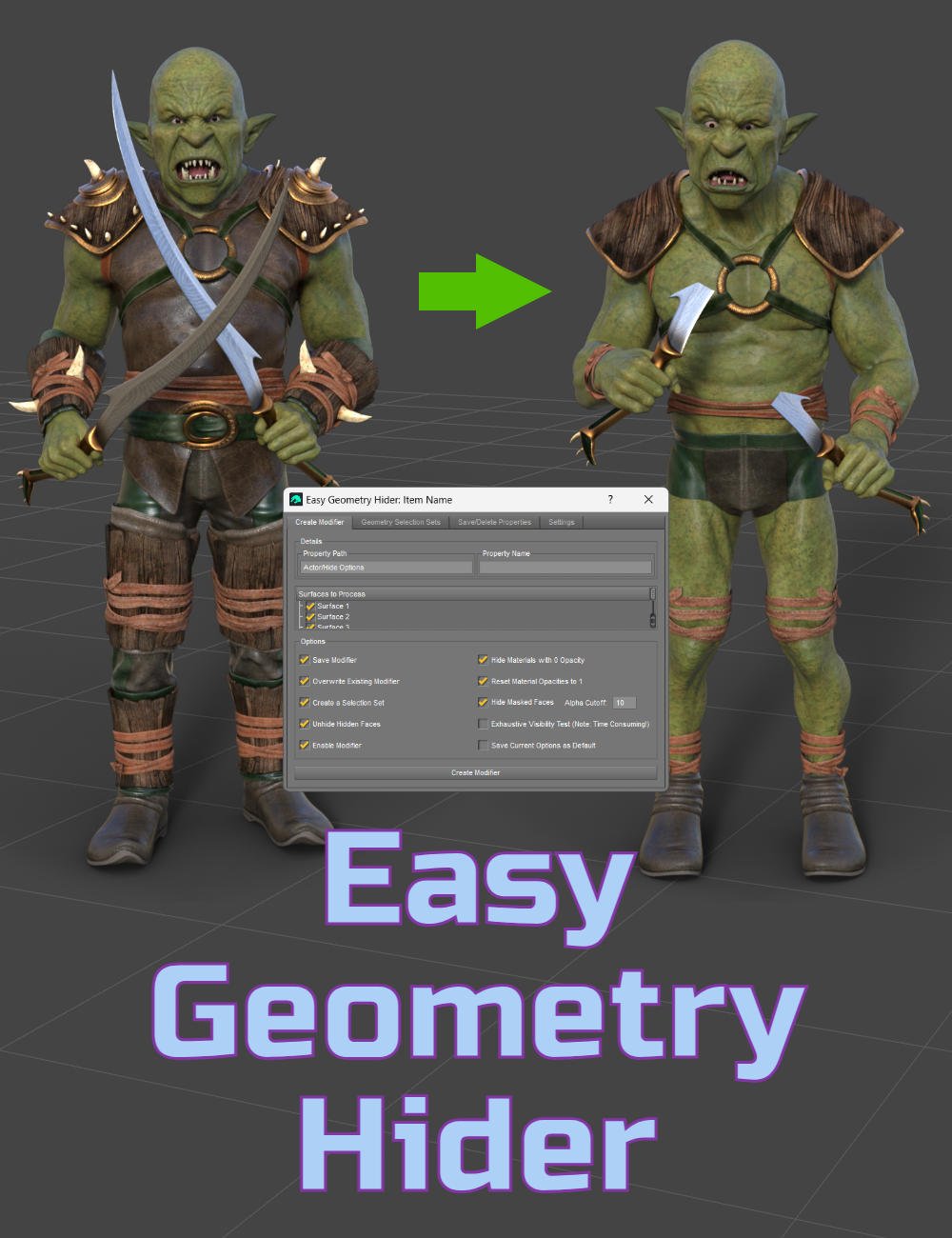
Easy Geometry Hider [Commercial]

UtiltarianUtiltarian Posts: 55

Link to product: Easy Geometry Hider


Note: Daz Studio 4.12.0.86 and higher (including Daz Studio 2025) are supported. Please post here if you encounter any issues and have updated to the latest version of the tool.


Tired of fiddling with opacity settings to hide parts of your models? Wish you could kitbash more easily or hide geometry with a single click - all without losing your changes the next time you open your scene?


Enter conditional grafts and Easy Geometry Hider. Conditional grafts provide a reusable, one-click toggle for customizing your items, unlike visibility changes made in the Geometry Editor, which are temporary to your session, or cutout opacity changes, which lack flexibility and are lost when new material presets are applied. However, creating grafts involves a clunky, multi-step process.

Easy Geometry Hider strips away that complexity, reducing the entire process to just a few simple steps: hide the parts you don’t want, run the script, enter a name, and click Create.

But it doesn’t stop there. This toolset comes packed with helper scripts that make it easier to select and hide the parts you want hidden. You will get a new function in Geometry Editor that will expand your selection to the full UV island, the ability to automatically generate selection sets for all distinct parts or UV islands on your model, and the ability to generate selection sets out of morphs and existing conditional grafts. Selection sets let you toggle areas of your model with one click without having to manually select faces.

Also included is a tool to prep items with hidden geometry for simulation. Content hidden by conditional grafts can interfere with dForce simulations unless fully hidden in the Geometry Editor, or can distort the edge of the graft when smoothing is enabled. This tool will fully remove the hidden geometry during simulation and help you avoid this edge distortion.

Easy Geometry Hider supports all polygonal mesh items across all generations, including Poser content. It also offers the ability to save conditional grafts for non-figure props/environments by saving them as a runnable script.

What’s included:

  • Easy Hide Geometry: Main tool for creating and managing conditional grafts, as well as generating selection sets from morphs, UV islands, connected geometry, or existing grafts.
  • Select UV Island: Grows your polygon selection to the full UV island. Works in both the Geometry Editor and Node Weight Map Brush tools, as well as for vertex and edge selection.
  • Create UV Island Selection Sets: Automatically creates a selection set for every UV island on the model.
  • Create Connected Selection Sets: Automatically creates a selection set for every distinct part of the mesh.
  • Create Selection Sets from Morphs: Converts morphs into selection sets. Useful for converting hide morphs into grafts. Since morphs can only shrink geometry, the hidden parts remain in the scene and continue to use up VRAM. Grafts fully hide the content and can therefore reduce the item’s memory footprint.
  • Hide Grafted Geometry Pre-Simulation: Hides geometry affected by enabled grafts to prevent simulation issues.
  • Unhide Hidden Geometry: Restores the effects of Hide Grafted Geometry.
  • User Manual: Includes step-by-step user guide and feature explanation.


If anyone needs any usage help, or a further explanation of any feature, post away and I'll do my best to help.

 

Post edited by Utiltarian on
«1

Comments

  • markusmaternmarkusmatern Posts: 597
    edited May 22

    After first posting about my problems in 4.22 I saw your explanation about the mixup with the latest version. Guess I either have to wait or install 4.24...

    Edit:
    Installed 4.24 and the scripts are working now...

    Post edited by markusmatern on
  • ElorElor Posts: 3,135

    Hello,

    On the last promo render, you're showing adding a 'slit effect' on a dress. Is it something done inside Daz Studio, helped by your product, with a non slited dress ?

  • GoggerGogger Posts: 2,483
    edited May 22

    A link for everyone's convenenience.

    https://www.daz3d.com/easy-geometry-hider

    Post edited by Gogger on
  • UtiltarianUtiltarian Posts: 55

    markusmatern said:

    After first posting about my problems in 4.22 I saw your explanation about the mixup with the latest version. Guess I either have to wait or install 4.24...

    Edit:
    Installed 4.24 and the scripts are working now...

    Yeah, that's my bad. When I saved the scripts in the latest version of Daz Studio, I didn't specify any version number. What I didn't realize is that this prevents the scripts from launching at all on earlier versions. Hoping they will validate the updated scripts in the next few days to enable support on earlier versions too. 

  • MadaMada Posts: 2,043

    Looks like an awesome product - thank you! :)

  • UtiltarianUtiltarian Posts: 55
    edited May 22

    Elor said:

    Hello,

    On the last promo render, you're showing adding a 'slit effect' on a dress. Is it something done inside Daz Studio, helped by your product, with a non slited dress ?

    Yes, the slit was added to the non-slitted dress from dForce In Bloom Outfit for Genesis 9 directly in Daz Studio. Selecting the slit doesn't use my tool, but my tool is used to create the conditional graft (that is, to make it reusable in the future), and the conditional graft in conjunction with my tool are used to accurately simulate the item. Here's a description of the steps I used on this particular dress:

    1. Enter Wire Texture Shaded View to more easily see the polygons.
    2. Open the Tool Settings panel, and enter Geometry Editor.
    3. Select a slit in the dress. The most straightforward way is to click and drag all the polygons. My preferred way is to click the topmost polygon, create a selection set from it, hide the one polygon, then select 2 polygons below it and use the Select Loop function (using the Ctrl+shortcut), and adding the polygons to the selection set I had created. Can explain this further if needed.
    4. With the slit polygons selected, create a selection set from selected. It'll ask you for a name, you can use whatever.
    5. Hide the selection set by toggling the eye icon (left of the polygon count).
    6. Run the Easy Geometry Hider script, enter a name for the property, ensure "Save Modifier" is checked if you want to reuse the slit in the future, and click "Create".
    7. Once created, you'll want to exit from Geometry Editor to see the graft take effect, e.g. to Node Selection mode.
      a. Assuming you saved it, the tool will have now created a property that you can use in the future, avoiding the need to perform steps 1-7. If you didn't enable the save option, the property will be saved to your scene, but won't be available on future usage on the item. Tab 3 of the tool lets you save properties that you didn't initially save (for example, if you were experimenting).
    8. With the graft enabled, run the Hide Grafted Geometry Pre-Simulation script. For this item/example, since the slit is 1 polygon wide, I needed to use 0 (and disable smoothing on the item). If the slit were 3 polygons wide or more, you could use 1 or 2 for the prompted value.
    9. Run the simulation. The slit will separate naturally.

    If you then want to use the same dress with a slit in the future, such as in another scene, you would start from step 7a: enable the "Hide Slit" property, run the Hide Grafted Geometry Pre-Simulation script using 0 (and in this case, disable smoothing if enabled), and run the simulation.

    Now, you don't actually need to create a conditional graft if you don't want to, which is where my tool steps in. You could simulate the dress after step 5 with just the polygons hidden. However, the results won't be as clean as when using a conditional graft (as seen in "Simulation without graft"), because the hidden geometry still affects the subdivision, which causes the polygon stretching. To alleviate, you could set the item to base resolution, or utilize a conditional graft.

    Also, hidden polygons in Geometry Editor are not saved to your screen, meaning each time the scene is loaded, you would need to re-hide the slit. On the other hand, the state of your conditional graft is saved to the scene, so everything would remain hidden the next time you load it (not to mention that they can be used in other scenes or other item instances).

    Hopefully that answers your question as to the role of my product in creating the slit effect.

    1 - Enable Wire Texture Shaded View.png
    877 x 1064 - 643K
    2 - Enter Geometry Editor Mode.png
    561 x 616 - 44K
    3 - Select faces intended for the slit.png
    987 x 1043 - 950K
    4 - Create selection set.png
    1265 x 1056 - 1017K
    5 - Hide the selection set.png
    1288 x 1052 - 964K
    6 - Run the tool to create.png
    741 x 567 - 45K
    7 - Exit Geometry Editor.png
    1292 x 1056 - 683K
    7a - New setting.png
    530 x 967 - 60K
    8 - Run Pre-Simulation script.png
    864 x 264 - 41K
    9 - Simulate.png
    988 x 1056 - 848K
    Simulation without graft.png
    978 x 1053 - 858K
    Post edited by Utiltarian on
  • UtiltarianUtiltarian Posts: 55

    Gogger said:

    A link for everyone's convenenience.

    https://www.daz3d.com/easy-geometry-hider
     

    Oh yeah, a link! Good idea.


    Mada said:

    Looks like an awesome product - thank you! :)

    Thanks Mada! I think it was your products that I first saw utilizing grafts, and what largely inspired me to make it easier to create and work with them.

  • ElorElor Posts: 3,135

    Utiltarian said:

    Hopefully that answers your question as to the role of my product in creating the slit effect.

    Yes, perfectly !

  • ChoppskiChoppski Posts: 627

    Everytime I try to use it I get an error message. What is the minimum ds version this can work with? I have ds 4.22

  • MelanieLMelanieL Posts: 7,712

    Choppski said:

    Everytime I try to use it I get an error message. What is the minimum ds version this can work with? I have ds 4.22

    Read the bottom paragraph of the first post above - it's an mistake which is being fixed asap. 

  • ChoppskiChoppski Posts: 627

    MelanieL said:

    Choppski said:

    Everytime I try to use it I get an error message. What is the minimum ds version this can work with? I have ds 4.22

    Read the bottom paragraph of the first post above - it's an mistake which is being fixed asap. 

    Oh, duh, thank you!. 

  • rhye_7b205b2b74rhye_7b205b2b74 Posts: 100

    Just bought this and see the update has not been included, any news on the update, have rolled back to 4.21.0.5 as this version never slows up or crashes like all those after it! 

  • UtiltarianUtiltarian Posts: 55
    edited May 24

    rhye_7b205b2b74 said:

    Just bought this and see the update has not been included, any news on the update, have rolled back to 4.21.0.5 as this version never slows up or crashes like all those after it! 

    Unfortunately no news as of yet. Submitted the fix just before the official release, but it's still awaiting QA, which (from my minimal experience) will probably take a day or two. Since it's the weekend now, and then Memorial day Monday, I'm assuming mid-next week or so. Unfortunate timing :/

    Good news, I've found a fix! I updated my main post, just download the zip and run the attached script inside the folder with the rest of the scripts. Forums don't let me post the script directly, hence the zip. Let me know if you have any issues!

    Post edited by Utiltarian on
  • barbultbarbult Posts: 26,160

    Where is the zip file attachment?
    Oh, I see it is attached to the first message, but hidden but the Daz forum bug that often hides attachments to the first message in the thread.The workaround to force it to appear is to Ctrl-click on the date (May 22) beneath your avatar image in the first message in the thread. That action opens the first message in a new window (at least in Firefox) and the attachment is no longer hidden there and can be downloaded.

  • barbultbarbult Posts: 26,160

    Maybe you should update your Avatar. That angry green frowny face is not very welcoming. wink You can upload an image of your choice via your forum profile. Or maybe you like what Daz gave you by default.

  • rhye_7b205b2b74rhye_7b205b2b74 Posts: 100

    Utiltarian said:

    rhye_7b205b2b74 said:

    Just bought this and see the update has not been included, any news on the update, have rolled back to 4.21.0.5 as this version never slows up or crashes like all those after it! 

    Unfortunately no news as of yet. Submitted the fix just before the official release, but it's still awaiting QA, which (from my minimal experience) will probably take a day or two. Since it's the weekend now, and then Memorial day Monday, I'm assuming mid-next week or so. Unfortunate timing :/

    Good news, I've found a fix! I updated my main post, just download the zip and run the attached script inside the folder with the rest of the scripts. Forums don't let me post the script directly, hence the zip. Let me know if you have any issues!


    Thanks.

    Put the fix in specified folder and run a script with no error messages but it does revert me to opening up a folder and finding the .dsa scripts outside of Daz. Is that correct?

  • barbultbarbult Posts: 26,160

    rhye_7b205b2b74 said:

    Utiltarian said:

    rhye_7b205b2b74 said:

    Just bought this and see the update has not been included, any news on the update, have rolled back to 4.21.0.5 as this version never slows up or crashes like all those after it! 

    Unfortunately no news as of yet. Submitted the fix just before the official release, but it's still awaiting QA, which (from my minimal experience) will probably take a day or two. Since it's the weekend now, and then Memorial day Monday, I'm assuming mid-next week or so. Unfortunate timing :/

    Good news, I've found a fix! I updated my main post, just download the zip and run the attached script inside the folder with the rest of the scripts. Forums don't let me post the script directly, hence the zip. Let me know if you have any issues!


    Thanks.

    Put the fix in specified folder and run a script with no error messages but it does revert me to opening up a folder and finding the .dsa scripts outside of Daz. Is that correct?

    Did you run the script from within Daz Studio as instructed?

  • UtiltarianUtiltarian Posts: 55

    rhye_7b205b2b74 said:

    Thanks.

    Put the fix in specified folder and run a script with no error messages but it does revert me to opening up a folder and finding the .dsa scripts outside of Daz. Is that correct?

    I'm guessing this was from running one of the selection set scripts? If you run those before ever having run the main "Easy Geometry Hider" script, it'll ask you the first time to locate the main script, since they need to call into it. Once you locate it once, or if you run the "Easy Geometry Hider" script first, it won't prompt you again. Let me know if that was it, or it's some other issue.


    barbult said:

    Maybe you should update your Avatar. That angry green frowny face is not very welcoming. wink You can upload an image of your choice via your forum profile. Or maybe you like what Daz gave you by default.

    Ah yes, good call, I do look pretty angry there! New avatar coming soon cool

  • barbultbarbult Posts: 26,160
    edited May 25

    I got the attached error message in DS 2025. I had run Selection Sets from Morphs and the deleted some polygons from the selected morphs. I turned off visibility to selected polygons. Then I ran Easy Geometry Hider and got the error.

    Screenshot 2025-05-24 210652.jpg
    502 x 108 - 12K
    Post edited by barbult on
  • UtiltarianUtiltarian Posts: 55
    edited May 25

    barbult said:

    I got the attached error message in DS 2025. I had run Selection Sets from Morphs and the deleted some polygons from the selected morphs. I turned off visibility to selected polygons. Then I ran Easy Geometry Hider and got the error.

    Ah sorry, I should have clarified: the fix I posted only addresses the compatibility issue for users <4.24. For DS 2025, there were some more involved code fixes, so that'll require the full coming update unfortunately.

    Post edited by Utiltarian on
  • barbultbarbult Posts: 26,160

    Utiltarian said:

    barbult said:

    I got the attached error message in DS 2025. I had run Selection Sets from Morphs and the deleted some polygons from the selected morphs. I turned off visibility to selected polygons. Then I ran Easy Geometry Hider and got the error.

    Ah sorry, I should have clarified: the fix I posted only addresses the compatibility issue for users <4.24. For DS 2025, there were some more involved code fixes, so that'll require the full coming update unfortunately.

    OK, no problem. I'll watch for the DIM update. I use 4.24 for any real work. I just wanted to test other versions. It worked OK for me in an old 4.22 General Release I have.

  • UtiltarianUtiltarian Posts: 55
    edited May 25

    barbult said:

    OK, no problem. I'll watch for the DIM update. I use 4.24 for any real work. I just wanted to test other versions. It worked OK for me in an old 4.22 General Release I have.

    Sounds good. Although everything the tool offers seems to work in DS 2025 (after the fixes), DS 4 is definitely more usable at the moment. All the right click menus seem to be missing in the Geometry Editor panel on DS 2025, which makes working in that mode more difficult. Not sure if that's just because the app is Alpha, or maybe that the configuration for them is missing.

    Post edited by Utiltarian on
  • barbultbarbult Posts: 26,160

    Utiltarian said:

    barbult said:

    OK, no problem. I'll watch for the DIM update. I use 4.24 for any real work. I just wanted to test other versions. It worked OK for me in an old 4.22 General Release I have.

    Sounds good. Although everything the tool offers seems to work in DS 2025 (after the fixes), DS 4 is definitely more usable at the moment. All the right click menus seem to be missing in the Geometry Editor panel on DS 2025, which makes working in that mode more difficult. Not sure if that's just because the app is Alpha, or maybe that the configuration for them is missing.

    The right click menus in the Geometry Editor tool seem to work OK for me in DS 2025. What do you mean by the Geometry Editor panel?

    Screenshot 2025-05-24 230104 DS 2025 Alpha Version.jpg
    655 x 496 - 42K
    Screenshot 2025-05-24 230014 Right Click Geometry Editor DS 2025.jpg
    863 x 688 - 60K
  • rhye_7b205b2b74rhye_7b205b2b74 Posts: 100
    edited May 25

    Did you run the script from within Daz Studio as instructed?

    Yes I did from your within within Scripts in Daz, but it could not find the corresponding scripts, perhaps it only accepts a C: drive path in your coding?

    however it did work when I clicked on the DSA file from the folder it is in

    Post edited by rhye_7b205b2b74 on
  • ChoppskiChoppski Posts: 627

    FWIW it worked, sort of. I tried to use it to hide part of a grafted gens, and it said it did it, and I guess it did, but when I tried to open the scene again, DS crashed. I suppose we shouldn't use it on other grafted items?

  • UtiltarianUtiltarian Posts: 55
    edited May 26

    Choppski said:

    FWIW it worked, sort of. I tried to use it to hide part of a grafted gens, and it said it did it, and I guess it did, but when I tried to open the scene again, DS crashed. I suppose we shouldn't use it on other grafted items?

    I might need a bit more info, because I'm not sure I fully understood the situation. (Also, is this DS 4.22?)

    Were you trying to create the conditional graft on the base figure (that had a grafted gens), or on the gens graft itself? And was it just a one time crash, or does it only now crash every time you try to load your scene? If the crash happens every time, did you save the graft when you made it? If so, you can try to delete/rename the conditional graft and see if the scene still crashes when trying to load. To find the path, you can load the figure in a fresh scene, find the conditional graft in the parameters pane, and view its settings (image attached how to view the settings), it should have the file path there.

    If the scene continues to crash even after removing the conditional graft, then it's likely something else in the scene and not related the graft. But if it solves the crash, then that'll confirm it was the conditional graft.

    I haven't experienced any problems using the tool to create conditional grafts on attached geografts, nor have they caused scenes to crash for me. The same goes for creating a conditional graft on the base figure - this should work just the same whether or not you have geografts attached to the figure, and you shouldn't have to remove them.

    That said, it's possible I might have overlooked something, so any extra info would be helpful to troubleshoot the cause.

    graft location.png
    370 x 95 - 6K
    Post edited by Utiltarian on
  • UtiltarianUtiltarian Posts: 55

    barbult said:

    The right click menus in the Geometry Editor tool seem to work OK for me in DS 2025. What do you mean by the Geometry Editor panel?

    This was what I was referring to ("pane" I guess is the correct term, not "panel"). If you right click any of those, whether selection sets or surfaces, no menu pops up, unlike in DS 4.xx. At least not for me.


    geometry tool pane.png
    475 x 617 - 75K
  • ChoppskiChoppski Posts: 627

    Utiltarian said:

    Choppski said:

    FWIW it worked, sort of. I tried to use it to hide part of a grafted gens, and it said it did it, and I guess it did, but when I tried to open the scene again, DS crashed. I suppose we shouldn't use it on other grafted items?

     I might need a bit more info, because I'm not sure I fully understood the situation. (Also, is this DS 4.22?)

    Were you trying to create the conditional graft on the base figure (that had a grafted gens), or on the gens graft itself? And was it just a one time crash, or does it only now crash every time you try to load your scene? If the crash happens every time, did you save the graft when you made it? If so, you can try to delete/rename the conditional graft and see if the scene still crashes when trying to load. To find the path, you can load the figure in a fresh scene, find the conditional graft in the parameters pane, and view its settings (image attached how to view the settings), it should have the file path there.

    If the scene continues to crash even after removing the conditional graft, then it's likely something else in the scene and not related the graft. But if it solves the crash, then that'll confirm it was the conditional graft.

    I haven't experienced any problems using the tool to create conditional grafts on attached geografts, nor have they caused scenes to crash for me, but that doesn't mean I might not have overlooked something, so the above info would be helpful to troubleshoot.

    As for when creating conditional grafts on a base figure with grafts, generally, it's better to detach geografts from an object before you use the tool to create a conditional graft, because the tool isn't able to differentiate between content that you hid because you want it to be part of your conditional graft, and content that the geograft is hiding, so it'll include the faces hidden by the graft as well. (Note: this is specifically for geografts, you can keep conditional grafts enabled, this won't have a negative effect.) So if you do have a geograft attached, you can either uncheck the related surfaces in Easy Geometry Hider so that the tool ignores those grafted areas, or temporarily detach the geograft. Alternatively, you can always restore the flawed conditional graft to a selection set at a later time, and re-create it by re-adding the incorrectly hidden area.

    However, aside from the improper hiding, it shouldn't cause your scene to crash, and I haven't experienced this fom my testing. But as before, it's possible I might have overlooked something, so any extra info would be helpful to find the cause.

    I was foolish and did not read the pdf very carefully. What happened was that I selected some surfaces on the gens graft, put opacity to 0, and then ran the script. I didn't notice anything different, but when I put the opacity to 100, nothing changed--i.e., the surfaces were still gone. However, when I tried to unhide the new graft, nothing seemed to happen. I did NOT save the scene because I feared it would ruin what I had, which was foolish because I could have saved it as an alternate scene. When I try to open it, it always crashes as it is trying to load items. I also tried opening a backup of the scene and it crashed. I worried that I had damaged the gens graft, but I opened other scenes with the gens and they opened fine. I think the issue was that I should haven't tried it on a geografted item first and that I should have saved the scene separately. Fortunately the scene in question was nothing vital.  Oh, but the figure ALSO had the legacy geografts to use genesis 8 materials. So I wonder if there were too many geografts and I did not detach the graft. Mostly, I should have played with it on something like clothes or hair before trying a geograft.

  • barbultbarbult Posts: 26,160

    Choppski said:

    Utiltarian said:

    Choppski said:

    FWIW it worked, sort of. I tried to use it to hide part of a grafted gens, and it said it did it, and I guess it did, but when I tried to open the scene again, DS crashed. I suppose we shouldn't use it on other grafted items?

     I might need a bit more info, because I'm not sure I fully understood the situation. (Also, is this DS 4.22?)

    Were you trying to create the conditional graft on the base figure (that had a grafted gens), or on the gens graft itself? And was it just a one time crash, or does it only now crash every time you try to load your scene? If the crash happens every time, did you save the graft when you made it? If so, you can try to delete/rename the conditional graft and see if the scene still crashes when trying to load. To find the path, you can load the figure in a fresh scene, find the conditional graft in the parameters pane, and view its settings (image attached how to view the settings), it should have the file path there.

    If the scene continues to crash even after removing the conditional graft, then it's likely something else in the scene and not related the graft. But if it solves the crash, then that'll confirm it was the conditional graft.

    I haven't experienced any problems using the tool to create conditional grafts on attached geografts, nor have they caused scenes to crash for me, but that doesn't mean I might not have overlooked something, so the above info would be helpful to troubleshoot.

    As for when creating conditional grafts on a base figure with grafts, generally, it's better to detach geografts from an object before you use the tool to create a conditional graft, because the tool isn't able to differentiate between content that you hid because you want it to be part of your conditional graft, and content that the geograft is hiding, so it'll include the faces hidden by the graft as well. (Note: this is specifically for geografts, you can keep conditional grafts enabled, this won't have a negative effect.) So if you do have a geograft attached, you can either uncheck the related surfaces in Easy Geometry Hider so that the tool ignores those grafted areas, or temporarily detach the geograft. Alternatively, you can always restore the flawed conditional graft to a selection set at a later time, and re-create it by re-adding the incorrectly hidden area.

    However, aside from the improper hiding, it shouldn't cause your scene to crash, and I haven't experienced this fom my testing. But as before, it's possible I might have overlooked something, so any extra info would be helpful to find the cause.

    I was foolish and did not read the pdf very carefully. What happened was that I selected some surfaces on the gens graft, put opacity to 0, and then ran the script. I didn't notice anything different, but when I put the opacity to 100, nothing changed--i.e., the surfaces were still gone. However, when I tried to unhide the new graft, nothing seemed to happen. I did NOT save the scene because I feared it would ruin what I had, which was foolish because I could have saved it as an alternate scene. When I try to open it, it always crashes as it is trying to load items. I also tried opening a backup of the scene and it crashed. I worried that I had damaged the gens graft, but I opened other scenes with the gens and they opened fine. I think the issue was that I should haven't tried it on a geografted item first and that I should have saved the scene separately. Fortunately the scene in question was nothing vital.  Oh, but the figure ALSO had the legacy geografts to use genesis 8 materials. So I wonder if there were too many geografts and I did not detach the graft. Mostly, I should have played with it on something like clothes or hair before trying a geograft.

    If you expect to see something happen (change) with with the Easy Geometry Hider results, be sure you don't have the Geometry Editor tool or Mesh Grabber tool, or something like that selected. They (by design) work differently, so designers can work on geografts.

  • barbultbarbult Posts: 26,160

    Utiltarian said:

    barbult said:

    The right click menus in the Geometry Editor tool seem to work OK for me in DS 2025. What do you mean by the Geometry Editor panel?

    This was what I was referring to ("pane" I guess is the correct term, not "panel"). If you right click any of those, whether selection sets or surfaces, no menu pops up, unlike in DS 4.xx. At least not for me.

    That is the Tool Settings pane view, when the selected tool is the Geometry Editor. You are correct. The right click there does not work for me either in DS 2025 Apha. I hadn't tried it until you mentioned it. You can report the problem in the Alpha forum thread if you want to. I haven't had much luck at all at getting any response to questions about whether a problem I report is a bug, not implemented, coming later, or my own error. That thread gets occasional status information from Richard Haseltine or Doctorjellybean, but it I feel ignored there for the most part. crying

Sign In or Register to comment.