Issue with Side Swept Glam Hair
 vaaern
Posts: 90
vaaern
Posts: 90
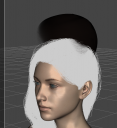
I bought this product because it would fit really well with a new character I was making. But Even just loading it on base genesis 8 and adjust some adjustments moves the whole cap (the black in the picture). I don't see any place to lock it, but it's also the first time I've noticed it with a OOT products.
Screenshot 2025-05-20 221340.png
781 x 852 - 300K

Daz 3D is part of 
Connect
DAZ Productions, Inc.
7533 S Center View Ct #4664
West Jordan, UT 84084
Licensing Agreement | Terms of Service | Privacy Policy | EULA
© 2026 Daz Productions Inc. All Rights Reserved.
Comments
Have the exact same issue. You also can't change color, It seems like the loading hair item just loads the "ghost cap" if you notice on the scene tab, instead of loading "Side swept glam hair" it loads "Side Swept Glam Style Cap Ghost G8"... Seems like the creator made a mistake setting what the load button chooses to load. I think the only way to "fix" it would be to contact daz support and ask them for a fix, or a refund in the worst case scenario..
EDIT: Seems like it works for someone else, Not entirely sure what I'm doing wrong then.
They work for me, as long as the preset matches the figure (Genesis 8 for 8/8,1, unlabelled for Genesis 9) and as long as an Iray render/preview is used (the change doesn't show in Texture Shaded).
Hmm... Then i'm not sure what I'm doing wrong. Whenever I load the hair item I just loads an item called "Ghost cap" and when I try to change the presets the cap just moves around and also can't change color...
EDIT:
Ok, I had another hair loaded from the same creator and it seems like it was interfering, I deleted it from the scene and I can now change color, However, the hair cap issue still persists. Not sure why.
EDIT: 2
Alright, I think I managed to solve the issue.. There's an element inside the main object that is visible by default called "Side Swept Glam Style Cap G8" if you hide it the cap disappears and you can now change the presets.. A bit weird but it works.. I guess it may be a small oversight by the creator. Hope this results useful for someone else in the future who may encounter the same issue.
You have a Soft Curl Long hair from OOT already loaded on the figure... that's the culprit. If you want to change the color of one OOT strand-based hair, you should move that hair node to the top, i.e. before another OOT hair...because the hair caps on OOT SBHs always have the very same Node Name (it's a wrong way to me... each root hair node should have a dedicated Node Name...) ~~ then H.Material Preset will always change the color of the 1st hair node.
As for the issue of ghost hair cap (it's used for giving a better color of sculp...) moving, I couldn't reproduct it ~~ not sure why.