A Few Questions About STEAM
 COMIXIANT
Posts: 260
COMIXIANT
Posts: 260
I've been looking into the latest release of Substance Painter and Substance Designer. Can't stand Adobe, nor do I like the idea of STEAM, but the only way to buy a perpetual licence of Painter and Designer, it appears, is through STEAM. I've literally never used STEAM before, but since it looks as if I have no choice in the matter, I have two very inportant quesitons about it.
The first relates to the authorisation system. I need to know whether, once installed and activated, do I need to have the machine connected to the interent in order to use Substance Painter or Substance Designer?
The second relates to platform. I notice it works on Linux. This is quite a biggie since I intend to move over to Linux completely in the near future. But do they mean I have to run a specific distribution of Linux or will STEAM run on whatever Linux distro I choose to run it on?

Daz 3D is part of 
Connect
DAZ Productions, Inc.
7533 S Center View Ct #4664
West Jordan, UT 84084
Licensing Agreement | Terms of Service | Privacy Policy | EULA
© 2026 Daz Productions Inc. All Rights Reserved.
Comments
Not constantly, but periodically - at least in general.
Steam supporting Linux doesn't mean particular applications or games will, At a quick glance Substance Painter certainly requires Windows.
Cheers Richard, I really hope you're wrong though!
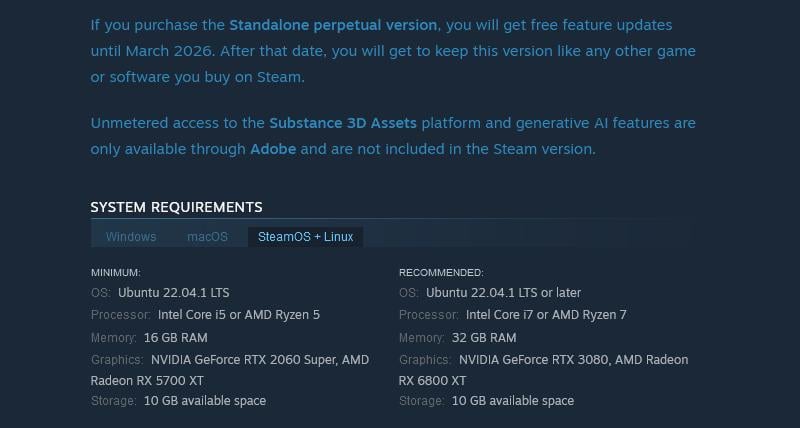
Please see this page (scroll to the part just before the reviews):
https://store.steampowered.com/app/3366290/Substance_3D_Painter_2025/
I've also taken a screenshot for convenience (and I did specifically click on the Linux tab for that), but is that for the STEAM client then, not the actual software? I mean according to that, it officially supports the LTS version of Ubuntu, and even more promising is that my system beats the minimum spec and actually meets the recommended spec, in fact I have the exact processor recommended (Ryzen 7).
I thought that was for the software itself, but you got me wondering now, because it might be for the STEAM client:
Ah, I hadn't noticed the other OS tabs - yes, then, it does appear to support Ubuntu Linux at least
Cheers Richard, and what a relief to hear!
I'm not planning to get it running on Linux right now, but the plan is to find a distro that will run the latest version of Daz Studio 4, Substance Designer and Painter, and DaVinci Resolve Studio and Blender. As long as it runs those then I never need to touch Windows ever again.
Since DaVinci Resolve Studio (and now Substance Designer and Painter too) are available as native Linux software just as Blender is, it's really only Daz Studio 4 now that I'd need to make work. Since the increasing amount of software that supports Linux is always targeting Ubuntu, there does at least seem to be an agreed target that the big software developers are targeting, so although we're not there yet, this does look very promising!
I don't participate in that Linux thread on here, because I'm not setting-up such an installation at the moment. But I have to say it seems a bit unfair that the Daz developers don't at least do what the other big companies are dong, and at least release a version of Daz Studio 4 that targets the LTS version oif Ubuntu (without support of course). Adobe didn't get to be the size they are through making poor business decisions, so the fact that they're now releasing for Ubuntu themselves, should tell people where the big corporates see all of this going.
If only Daz would release something intentionally designed for installation on the same LTS as Adobe and Blackmagic Design are now targeting, then the Linux-using community would no doubt help to iron-out any wrinkles they find. I just wish they'd throw the community a bone in that regard, show Linux the love it deserves, especially as it's our salvation as well as theirs (if only they would realise it).
Not sure which distributions are officially supported, but I've seen Steam used successfully with Ubuntu, Debian and Linux Mint. Some games and programs work well with it but not all.
About being connected to the internet, if the application relies on Steam's DRM (which in this case it most likely does), you will have to have the Steam client open and logged in to use it, so you will need to be connected to the internet.
I thought there was an option to work offline for a period. There is a Go Offline option in the Steam menu, but it has a ... and nothing happens when I click it so not sure what it does or if it is working.
The go offline mode is for the client itself, just disconnects things like the activities, friends and chat. The client itself is stilled logged in to your steam account.
this is something to make really sure of for whatever you're buying, in advance, because steam also sells products that rely on remote access to 3rd party hosts too.
OK, sorry then - though I am sure, way back, that there was a mode that let you work offline for a couple of weeks or so - for going on holiday or whatever when you might not have reliable access. I may well be misremembering, or it may have been removed since.
I can have Steam disconnected from the internet (turn off my wifi - absolutely no internet), start in offline mode, or just go offline from within Steam. Can still run Substance Painter (and play games, etc). There's no need for Steam to be connecting to the internet except to download things and update them (won't let you choose about updating, generally, as the 'Play' button gets replaced with 'Update Required' - though for many things they now offer a rollback feature to older versions).
Thanks all for the feedback on this, it's much appreciated!
I installed STEAM, opened an account and purchased something cheap and useful, just to see how it all works. Thankfully it seems you can run offline, although I'm wondering now, after what Silent Winter said, how long it allows you to be offline before needing to connect again.
I want to get back into wildcamping, and that means being away from home for weeks (and occassionally even months) on end. I have unlimited mobile broadband, but a signal isn't guaranteed when you're out there in the middle of nowhere. That could prove to be a real problem since I intended to buy a laptop so that I could relax and work on my Daz products even while out on a wildcamp. Unless I have some control over how that connection thing works (or at the very least know how long it permits between calling home), then sadly it would be of no use to me.
If anyone knows (for sure) how long Substance Painter 2025 and Substance Designer 2025 can go without connecting, I would really love to know!
Since both are also available for native Linux, I've decided to purchase the perpetual licence of Substance Painter and Substance Designer. If it decides to call home while I'm out on a wildcamp, I'll just have to find a signal good enough to do a quick log in.
I hate myself for purchasing anything from Adobe, I really do. But unfortunately, Blender's engine, under the hood, wasn't designed to do live painting of multiple map types (so I won't be holding my breath on that one). Armor Paint is far too basic, and the developer seems far too pre-occupied with mobile platforms. And Marmoset, cool as it is, doesn't have a native Linux version, which renders it completely out of the question for me.
So, decision made, and I've been looking for discount codes because I read you can use them on STEAM. I managed to find a discount code "SPRING20", which supposedly discounts your cart by 20% during May. I have both products added to the cart right now, but I can't see where I'm supposed to enter this code to discount the cart.
If anyone knows how to use the discount code (note I said discount code, not STEAM code), please let me know otherwise I'll have to feed the greed-machine 20% more than I have to. They've already more than doubled its price since they bought it from Allegorithmic, if my memory serves correct!
Please ignore my previous message since it was for selected titles only.
Just purchased them. I can always work on something else until I find a signal, should it decide to call home when there isn't one. Shouldn't be too hard to get my head around, either, since I've been watching plenty of tutorials on it, how to use it on Daz figures etc.
I just realised that I never even activated these products. Never been prompted to do so, and thankfully there was no need to have an Adobe account.
I read somewhere that you're permitted two simultaneous licences. That's great since I could use the other on a laptop when wildcamping, without the need to de-activate it on my main machine. But if I did need to deactivate it, say, to move over to another machine or replace a drive, how exactly is deactivation done when it was never activated in the first place?
Steam typically works on a concurrency basis, which means that it will block you from running things on more than [licensed] devices concurrently...
Games it will only allow you to run one at a time, though... So when a game is running in Steam on one machine, and you try to start another game on another machine on the same account, it will complain... ;)
I'm so damn pleased to get a reply on this, and it's been driving me mad trying to find out!
What you wrote sounds perfect since there's only me that will be using my license anyway. I like the idea of it being limited by concurrency and not the activation status. In that case it sounds as if I can go ahead and do an SSD refromat.
Cheers, much appreciated.
No chance of that I'm afraid. I do love those old steam-powered machines, but when it comes to transport power, it's combustion all the way for me!

Vrummmmmmmmm ... Vrummm-Vrummm-Vrummm ...
Vrrrrrrrrrrrrrrrrrrrrrrrrrrrrrrrrrrrrrrrrrrrrrrrrrrrrrummmm !!!