Problem With Genesis 3 Renders In 3Delight

I noticed a problem with Genesis 3 renders in 3Delight.  If any of you can blow up the sample render that I attached, you will nottice a series of horizontal "ripples" along the center axis of the figure.  These lines are between the breasts and above and below the naval.  When I noticed it the other day, I looked at some different figures and they all seem to have this issue.  Does anyone have any thoughts on this?
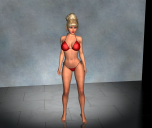
image.png
1062 x 894 - 1M

Comments

  • DaWaterRatDaWaterRat Posts: 2,885

    That's normally an issue with the AoA subsurface shader's scaling being set too low for the image. Try raising it.

  • bryanll1bryanll1 Posts: 141

    I'll look into that when I get home.  Is that setting for the skin under the surfaces tab?

  • DaWaterRatDaWaterRat Posts: 2,885
    edited March 2016

    Yep, it's on the surfaces tab.  The top of the tab should tell you which shader is being used (omHumanSurface, AoA Subsurface, DAZ default, etc) and then you'll need to scroll down a bit to the Shading Scale

    If it isn't the AoA subsurface, then I'm less sure of what could be causing it.

    Post edited by DaWaterRat on
  • bryanll1bryanll1 Posts: 141

    I went all over the place with the shading rate, but it didn't do sny good.

  • fixmypcmikefixmypcmike Posts: 19,685

    Make sure you're using the SUbSurface shading right, and not the general shading rate.

  • bryanll1bryanll1 Posts: 141

    Make sure you're using the SUbSurface shading right, and not the general shading rate.

    Please elaborate.  I'm on the surfaces tab, under skin.  I tried changing both the Shading Rate and the Shading Scale, but neither had an effect.

  • DaWaterRatDaWaterRat Posts: 2,885

    What's the Group ID?  If it's 1, change it.  There's a weird quirk in the shader about that.

  • cosmo71cosmo71 Posts: 3,609
    edited March 2016

    Has something to do with the G3F mesh I suggest.

    1. What SubD Algo do you use? (I prefer catmull clark legacy and soft corners / soft edges)

    2. Do you use the smoothing modifer on G3F? If what values do you have?

    3. If you use Raytraced, what are your values (shadow bias) ?

    Also possible a bad made "normal map" try a render without the normal map or turn the strength of the normal map to zero

    Post edited by cosmo71 on
  • bryanll1bryanll1 Posts: 141

    Group ID is 61

  • bryanll1bryanll1 Posts: 141
    cosmo71 said:

    Has something to do with the G3F mesh I suggest.

    1. What SubD Algo do you use? (I prefer catmull clark legacy and soft corners / soft edges)

    2. Do you use the smoothing modifer on G3F? If what values do you have?

    3. If you use Raytraced, what are your values (shadow bias) ?

    Also possible a bad made "normal map" try a render without the normal map or turn the strength of the normal map to zero

    I'm getting this result no matter what character I use.  I am using stock settings, being relatively new to this. The settings you're asking about are like Greek to me.

  • DaWaterRatDaWaterRat Posts: 2,885

    Okay, can you post some screen captures of your parameters tab?  (You may need to do a couple to get it all)

    I don't use G3 often, but the only time I've had an issue like the one you show at the top is when there was an issue with the Shading Rate or the Shading Scale for the Subsurface shader, so I want to see what your settings are before I offer anything more.

  • cosmo71cosmo71 Posts: 3,609
    bryanll1 said:
    cosmo71 said:

    Has something to do with the G3F mesh I suggest.

    1. What SubD Algo do you use? (I prefer catmull clark legacy and soft corners / soft edges)

    2. Do you use the smoothing modifer on G3F? If what values do you have?

    3. If you use Raytraced, what are your values (shadow bias) ?

    Also possible a bad made "normal map" try a render without the normal map or turn the strength of the normal map to zero

    I'm getting this result no matter what character I use.  I am using stock settings, being relatively new to this. The settings you're asking about are like Greek to me.

    Well, I do not use the Subsurface shader as like it should be used, I have turned Subsurface off and have fixed all values and edited the skins of my G3Fs and also my G3Ms for my needs so it looks good in 3Delight. I am not a friend of SSS. (SubSurfaceShader) So maybe I am not a good help for the original SSS because I do not use it this way.

    I have had some issues like you have on arms, legs and the hips so I have changed the SubD Algo and everything was fine, the thing in DS4.8 is that it can crash if you have changed the SubD Algo from "catmark" to "catmull clark legacy" and you make your character or just bodyparts of you character invisible. In DS4.9 this should not happen DAZ has told me. Well I still use DS4.8 so.

    You can change the SubD Algo and also the Edge Interpolation under parameters > general > Mesh Resolution

  • bryanll1bryanll1 Posts: 141
    cosmo71 said:
    bryanll1 said:
    cosmo71 said:

    Has something to do with the G3F mesh I suggest.

    1. What SubD Algo do you use? (I prefer catmull clark legacy and soft corners / soft edges)

    2. Do you use the smoothing modifer on G3F? If what values do you have?

    3. If you use Raytraced, what are your values (shadow bias) ?

    Also possible a bad made "normal map" try a render without the normal map or turn the strength of the normal map to zero

    I'm getting this result no matter what character I use.  I am using stock settings, being relatively new to this. The settings you're asking about are like Greek to me.

    Well, I do not use the Subsurface shader as like it should be used, I have turned Subsurface off and have fixed all values and edited the skins of my G3Fs and also my G3Ms for my needs so it looks good in 3Delight. I am not a friend of SSS. (SubSurfaceShader) So maybe I am not a good help for the original SSS because I do not use it this way.

    I have had some issues like you have on arms, legs and the hips so I have changed the SubD Algo and everything was fine, the thing in DS4.8 is that it can crash if you have changed the SubD Algo from "catmark" to "catmull clark legacy" and you make your character or just bodyparts of you character invisible. In DS4.9 this should not happen DAZ has told me. Well I still use DS4.8 so.

    You can change the SubD Algo and also the Edge Interpolation under parameters > general > Mesh Resolution

    Changing to Catmull-Clark (Legacy) worked.  Problem solved.  Thanks!

  • cosmo71cosmo71 Posts: 3,609
    edited March 2016
    bryanll1 said:
    cosmo71 said:
    bryanll1 said:
    cosmo71 said:

    Has something to do with the G3F mesh I suggest.

    1. What SubD Algo do you use? (I prefer catmull clark legacy and soft corners / soft edges)

    2. Do you use the smoothing modifer on G3F? If what values do you have?

    3. If you use Raytraced, what are your values (shadow bias) ?

    Also possible a bad made "normal map" try a render without the normal map or turn the strength of the normal map to zero

    I'm getting this result no matter what character I use.  I am using stock settings, being relatively new to this. The settings you're asking about are like Greek to me.

    Well, I do not use the Subsurface shader as like it should be used, I have turned Subsurface off and have fixed all values and edited the skins of my G3Fs and also my G3Ms for my needs so it looks good in 3Delight. I am not a friend of SSS. (SubSurfaceShader) So maybe I am not a good help for the original SSS because I do not use it this way.

    I have had some issues like you have on arms, legs and the hips so I have changed the SubD Algo and everything was fine, the thing in DS4.8 is that it can crash if you have changed the SubD Algo from "catmark" to "catmull clark legacy" and you make your character or just bodyparts of you character invisible. In DS4.9 this should not happen DAZ has told me. Well I still use DS4.8 so.

    You can change the SubD Algo and also the Edge Interpolation under parameters > general > Mesh Resolution

    Changing to Catmull-Clark (Legacy) worked.  Problem solved.  Thanks!

    The ripples are gone now?

    Post edited by cosmo71 on
  • bryanll1bryanll1 Posts: 141
    cosmo71 said:
    bryanll1 said:
    cosmo71 said:
    bryanll1 said:
    cosmo71 said:

    Has something to do with the G3F mesh I suggest.

    1. What SubD Algo do you use? (I prefer catmull clark legacy and soft corners / soft edges)

    2. Do you use the smoothing modifer on G3F? If what values do you have?

    3. If you use Raytraced, what are your values (shadow bias) ?

    Also possible a bad made "normal map" try a render without the normal map or turn the strength of the normal map to zero

    I'm getting this result no matter what character I use.  I am using stock settings, being relatively new to this. The settings you're asking about are like Greek to me.

    Well, I do not use the Subsurface shader as like it should be used, I have turned Subsurface off and have fixed all values and edited the skins of my G3Fs and also my G3Ms for my needs so it looks good in 3Delight. I am not a friend of SSS. (SubSurfaceShader) So maybe I am not a good help for the original SSS because I do not use it this way.

    I have had some issues like you have on arms, legs and the hips so I have changed the SubD Algo and everything was fine, the thing in DS4.8 is that it can crash if you have changed the SubD Algo from "catmark" to "catmull clark legacy" and you make your character or just bodyparts of you character invisible. In DS4.9 this should not happen DAZ has told me. Well I still use DS4.8 so.

    You can change the SubD Algo and also the Edge Interpolation under parameters > general > Mesh Resolution

    Changing to Catmull-Clark (Legacy) worked.  Problem solved.  Thanks!

    The ripples are gone now?

    Sort of.  Now there are 2 vertical lines and the mouth renders slightly open.  I found that V7 doesn't have this problem.

    cosmo71 said:
    bryanll1 said:
    cosmo71 said:
    bryanll1 said:
    cosmo71 said:

    Has something to do with the G3F mesh I suggest.

    1. What SubD Algo do you use? (I prefer catmull clark legacy and soft corners / soft edges)

    2. Do you use the smoothing modifer on G3F? If what values do you have?

    3. If you use Raytraced, what are your values (shadow bias) ?

    Also possible a bad made "normal map" try a render without the normal map or turn the strength of the normal map to zero

    I'm getting this result no matter what character I use.  I am using stock settings, being relatively new to this. The settings you're asking about are like Greek to me.

    Well, I do not use the Subsurface shader as like it should be used, I have turned Subsurface off and have fixed all values and edited the skins of my G3Fs and also my G3Ms for my needs so it looks good in 3Delight. I am not a friend of SSS. (SubSurfaceShader) So maybe I am not a good help for the original SSS because I do not use it this way.

    I have had some issues like you have on arms, legs and the hips so I have changed the SubD Algo and everything was fine, the thing in DS4.8 is that it can crash if you have changed the SubD Algo from "catmark" to "catmull clark legacy" and you make your character or just bodyparts of you character invisible. In DS4.9 this should not happen DAZ has told me. Well I still use DS4.8 so.

    You can change the SubD Algo and also the Edge Interpolation under parameters > general > Mesh Resolution

    Changing to Catmull-Clark (Legacy) worked.  Problem solved.  Thanks!

    The ripples are gone now?


  • cosmo71cosmo71 Posts: 3,609
    bryanll1 said:
    cosmo71 said:
    bryanll1 said:
    cosmo71 said:
    bryanll1 said:
    cosmo71 said:

    Has something to do with the G3F mesh I suggest.

    1. What SubD Algo do you use? (I prefer catmull clark legacy and soft corners / soft edges)

    2. Do you use the smoothing modifer on G3F? If what values do you have?

    3. If you use Raytraced, what are your values (shadow bias) ?

    Also possible a bad made "normal map" try a render without the normal map or turn the strength of the normal map to zero

    I'm getting this result no matter what character I use.  I am using stock settings, being relatively new to this. The settings you're asking about are like Greek to me.

    Well, I do not use the Subsurface shader as like it should be used, I have turned Subsurface off and have fixed all values and edited the skins of my G3Fs and also my G3Ms for my needs so it looks good in 3Delight. I am not a friend of SSS. (SubSurfaceShader) So maybe I am not a good help for the original SSS because I do not use it this way.

    I have had some issues like you have on arms, legs and the hips so I have changed the SubD Algo and everything was fine, the thing in DS4.8 is that it can crash if you have changed the SubD Algo from "catmark" to "catmull clark legacy" and you make your character or just bodyparts of you character invisible. In DS4.9 this should not happen DAZ has told me. Well I still use DS4.8 so.

    You can change the SubD Algo and also the Edge Interpolation under parameters > general > Mesh Resolution

    Changing to Catmull-Clark (Legacy) worked.  Problem solved.  Thanks!

    The ripples are gone now?

    Sort of.  Now there are 2 vertical lines and the mouth renders slightly open.  I found that V7 doesn't have this problem.

    cosmo71 said:
    bryanll1 said:
    cosmo71 said:
    bryanll1 said:
    cosmo71 said:

    Has something to do with the G3F mesh I suggest.

    1. What SubD Algo do you use? (I prefer catmull clark legacy and soft corners / soft edges)

    2. Do you use the smoothing modifer on G3F? If what values do you have?

    3. If you use Raytraced, what are your values (shadow bias) ?

    Also possible a bad made "normal map" try a render without the normal map or turn the strength of the normal map to zero

    I'm getting this result no matter what character I use.  I am using stock settings, being relatively new to this. The settings you're asking about are like Greek to me.

    Well, I do not use the Subsurface shader as like it should be used, I have turned Subsurface off and have fixed all values and edited the skins of my G3Fs and also my G3Ms for my needs so it looks good in 3Delight. I am not a friend of SSS. (SubSurfaceShader) So maybe I am not a good help for the original SSS because I do not use it this way.

    I have had some issues like you have on arms, legs and the hips so I have changed the SubD Algo and everything was fine, the thing in DS4.8 is that it can crash if you have changed the SubD Algo from "catmark" to "catmull clark legacy" and you make your character or just bodyparts of you character invisible. In DS4.9 this should not happen DAZ has told me. Well I still use DS4.8 so.

    You can change the SubD Algo and also the Edge Interpolation under parameters > general > Mesh Resolution

    Changing to Catmull-Clark (Legacy) worked.  Problem solved.  Thanks!

    The ripples are gone now?


    well I haven`t this issue I must say what light do you use?

  • cosmo71cosmo71 Posts: 3,609
    edited March 2016

    maybe it is the normal map have you characters skin a normal map? Or it is a morph that causes this.

    Post edited by cosmo71 on
  • jestmartjestmart Posts: 4,449

    The mouth rendering slightly open suggest that the figure is using AoA's SubSurface Shader.  That shader has a quirk with displacement, if the values for minimum or maximum are not zero and there is no displacement map the entire surface will be displaced as if there was an all white image in the map section.  The lines are a result of Shading Rate and Shading Scale and possibly Group ID.  All surfaces that use the same Group ID number must have the same Shading Rate and Shading Scale values. 

  • mjc1016mjc1016 Posts: 15,001
    jestmart said:

    The mouth rendering slightly open suggest that the figure is using AoA's SubSurface Shader.  That shader has a quirk with displacement, if the values for minimum or maximum are not zero and there is no displacement map the entire surface will be displaced as if there was an all white image in the map section.  The lines are a result of Shading Rate and Shading Scale and possibly Group ID.  All surfaces that use the same Group ID number must have the same Shading Rate and Shading Scale values. 

    And each figure should have a unique Group ID.

  • bryanll1bryanll1 Posts: 141
    mjc1016 said:
    jestmart said:

    The mouth rendering slightly open suggest that the figure is using AoA's SubSurface Shader.  That shader has a quirk with displacement, if the values for minimum or maximum are not zero and there is no displacement map the entire surface will be displaced as if there was an all white image in the map section.  The lines are a result of Shading Rate and Shading Scale and possibly Group ID.  All surfaces that use the same Group ID number must have the same Shading Rate and Shading Scale values. 

    And each figure should have a unique Group ID.

    The minimum and maximum are at 0 with no map.

Sign In or Register to comment.
