dforce issue with last 2 daz versions
 khryss666
Posts: 42
khryss666
Posts: 42
so this only seems to happen with biscuits kit hair and jam hair
ive zeroed and recompiled dforce kernals
ive tried with gen 8 and 9
happened in 4.23 and now also in 4.24
ive tried to zero everything i can find before simulation .. it used to work fine but now always looks like its blowing left
any help is appreciated
thanks
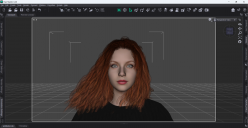
Daz Studio 4.24 4_29_2025 1_32_54 PM.png
1920 x 991 - 889K

Daz Studio 4.24 4_29_2025 2_14_18 PM.png
1920 x 991 - 1M
Post edited by khryss666 on

Daz 3D is part of 
Connect
DAZ Productions, Inc.
7533 S Center View Ct #4664
West Jordan, UT 84084
Licensing Agreement | Terms of Service | Privacy Policy | EULA
© 2026 Daz Productions Inc. All Rights Reserved.
Comments
When you say "it used to work fine" are you working with a copy of the hair you saved, or a premade scene/scene subset? do you have the character parented to anything? What happens if you use a completely blank figure (try one of the Dev Load figures)?
squishy thanks for the reply! ... i have tried to load fresh onto a completley blank figure (even after a fresh install of daz) also tried from saved scene
(its probly something simple that when it gets figured out ill feel dumb)
Would you show a pic of this problem with your timeline showing please?
I do not have Kit Hair, but I do have Biscuits Jam Hair, and when I tried it in 4.23 I am not seeing the same as you, the hair simulates as expected. See Image
You could try going into the surfaces tab and reducing the collision offset. I have seen dForced items fly around when the Collision offset is too high.
thank you havos ..
squishy .. this time it didnt happen !!!! but i dont think just opening the timeline did anything to it??
edit ... and i also tried it with a scene that i had with the messed up simulation already simulated .. and it also came out perfect when re simulated!!!
edit ... tried it with a new figure .. and back to the side swept and all trys do that ... why did it work 2x correctly??
Iunno ¯\_(ツ)_/¯
i think i figured out a work around ... if i just simulate , instead of simulate selected (ive always used simulate selected as its way faster) i dont have the issue
I have also had issues with Simulate Selected as well, but I prefer it when working in a larger scene where you only want to simulate against a few objects.
I did discover that Simulated Selected does work (at least for me) when you select the static objects first, and the dynamic ones last.
I have literally never used Simulate Selected (it never ocurred to me it might be faster) so I guess I've never encountered this problem before ¯\_(ツ)_/¯
I've always used "freeze simulation" on individual objects when I don't want to sim everything at once.